Speed Up Your Store with Speculation Rules in Bagisto
Bagisto continues to improve ecommerce performance with advanced front-end optimization features like Speculation Rules.
This browser-based technology predicts the next page a customer may visit and loads it in advance using prefetching and prerendering techniques.
In this blog, learn how Speculation Rules work in Bagisto, explore configuration options, and improve your store’s speed for a faster shopping experience.
What Are Speculation Rules?
Speculation Rules help browsers predict user actions and load the next page faster using prefetching or prerendering before a click.
There are two major strategies within speculation:
-
Prefetching – Loads static resources (HTML, CSS, JS) in the background.
-
Prerendering – Loads and renders the full page in the background.
Bagisto provides full control over both strategies in the admin panel, allowing you to fine-tune them to your needs.
Features of Speculation Rules in Bagisto
Here’s a breakdown of each available setting and what it does:
-
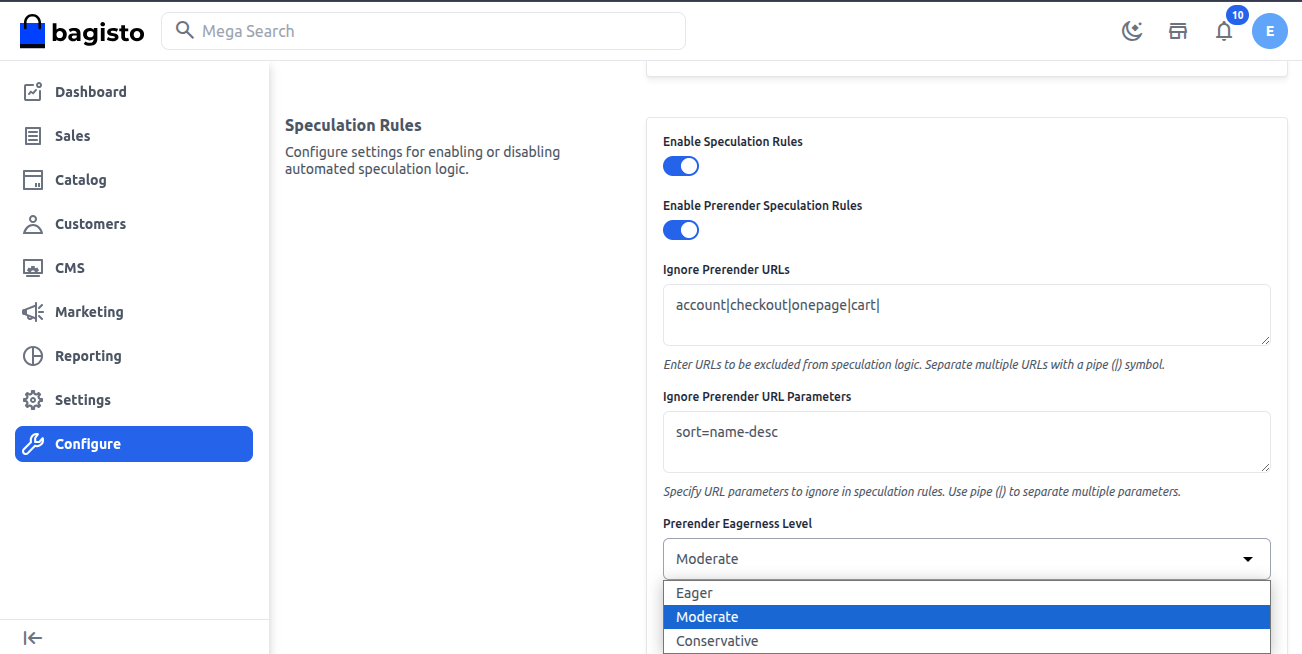
Enable Speculation Rules
This master switch enables or disables Speculation Rules. When enabled, the browser predicts and loads future pages in the background.
Use case: Improve performance on high-traffic pages like the homepage, category pages, and product listings where users frequently navigate between pages.
-
Enable Prerender Speculation Rules
When enabled, Bagisto prerenders pages in advance to improve loading speed. It is ideal for pages users are likely to visit next, such as product detail pages.
Use Case: On a product listing page (PLP), hovering over or focusing on a product link starts rendering the product detail page (PDP) in the background.
-
Ignore Prerender URLs
Some URLs may contain dynamic data or heavy elements. This setting allows you to exclude them from the prerender process.
Use case: These pages are user-specific or dynamic and shouldn’t be prerendered as that could lead to outdated or incorrect data being shown.
-
Ignore Prerender URL Parameters
This allows you to filter out certain query parameters so that URLs with tracking or session-specific parameters don’t get prerendered unnecessarily.
Use case: These parameters don’t impact page content and may lead to duplicate caching. Ignoring them improves efficiency.
-
Prerender Eagerness Level
Just like prerendering, prefetching comes with an eagerness level:
-
Eager: Renders nearly all linked pages, can consume more memory.
-
Moderate: Renders more pages, balancing speed and resource use.
-
Conservative: Renders only pages with high click probability.
Choose wisely based on how much resource usage your server can handle.
-
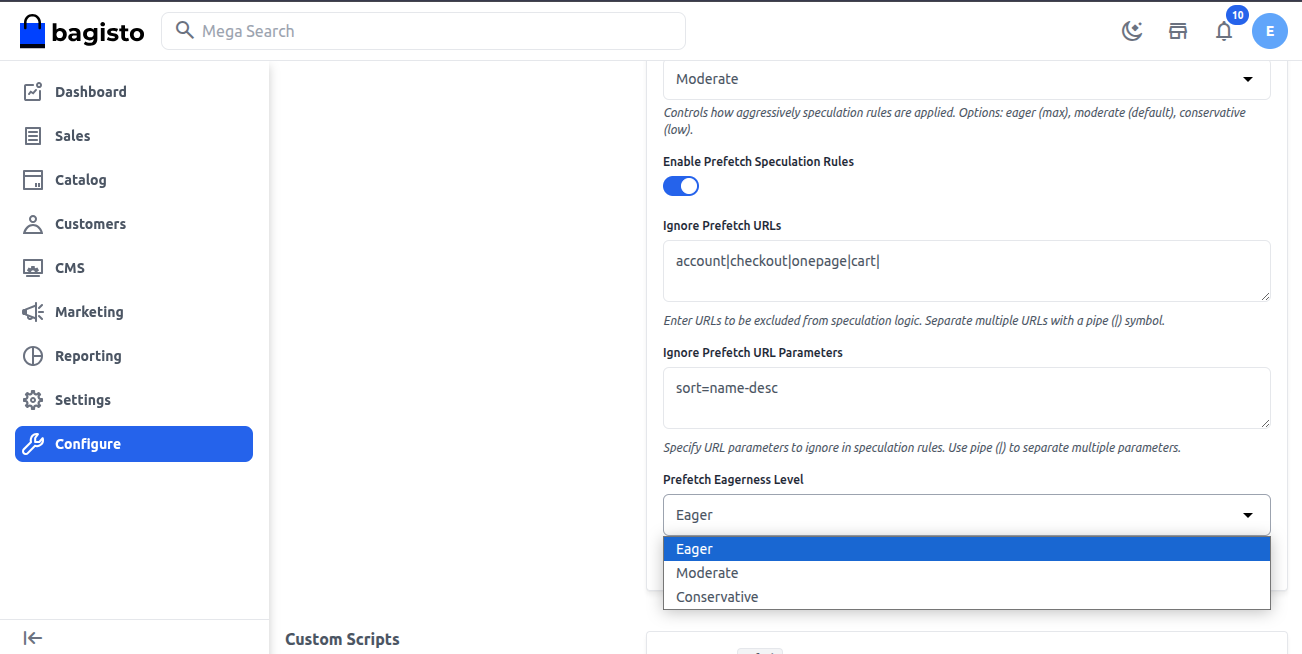
Enable Prefetch Speculation Rules
When enabled, Bagisto uses browser prefetching to load future page resources in the background.
It downloads assets like HTML, CSS, JS, and fonts without rendering the page, making navigation faster when users visit the link.
Use case: This helps speed up future navigation without consuming too many resources.
-
Ignore Prefetch URLs
Here, you can define URLs or patterns that should NOT be prerendered. This prevents resource waste and potential issues with dynamic pages.
Use case: These pages are user-specific or dynamic and shouldn’t be prerendered as that could lead to outdated or incorrect data being shown.
-
Ignore Prefetch URL Parameters
Some URLs may contain query parameters like tracking data or session tokens that do not affect page content.
Ignoring them helps prevent duplicate or unnecessary prerendering.
The “Ignore Prefetch URL Parameters” setting removes unnecessary query parameters to detect duplicate URLs and avoid repeated prefetching of the same content.
-
Prefetch Eagerness Level
Just like prerendering, prefetching comes with an eagerness level:
-
Eager: Prefetches most or all visible links, regardless of whether the user interacts with them.
-
Moderate: Prefetches a moderate set of links, typically visible on the screen or within proximity of the user’s viewport.
- Conservative: Prefetches only highly likely links.
Thanks for reading this blog. Feel free to share your questions in the comments below.
You can also hire laravel developers for your custom laravel projects. kindly explore our extensions.


Be the first to comment.