Per-Tenant Terminology in Laravel with a Custom Translator
Branding is a standard feature in most multi-tenant applications.
Implementing Per-Tenant Terminology in Laravel is another common requirement as organizations grow.
Tenants can customize the application’s branding with logos and colors. They also expect the terminology to match their organization’s language.
As applications grow, another customization request usually follows.
“Can we call Customers Members instead?”
The functionality doesn’t change, but the language does.
One organization might use Customer, another Member, and another Client. The same applies to terms like Project, Workspace, Case, or Employee.
The challenge isn’t replacing a word; it’s replacing it everywhere.
Why Per-Tenant Terminology in Laravel Matters
A common solution is to store custom labels in the database and reference them whenever text is displayed.
That works initially, but the logic quickly spreads across the application.
Soon you’re replacing terms in:
- Blade views
- Livewire components
- Filament resources
- Notifications
- Emails
- Validation messages
- Package translations
Every new feature needs to remember this logic.
Eventually, someone forgets, and the application becomes inconsistent.
Instead of solving the problem once, you’re solving it repeatedly
Using Laravel’s Translator for Per-Tenant Terminology
Every translated string in Laravel passes through the same service.
|
1 2 3 |
__('customers.title'); trans('customers.title'); |
Both eventually resolve through:
|
1 |
Illuminate\Translation\Translator |
That makes the Translator the ideal place to customize terminology.
Rather than changing your views or translation files, you can modify the final translated string before Laravel returns it.
The rest of the application continues working exactly as before.
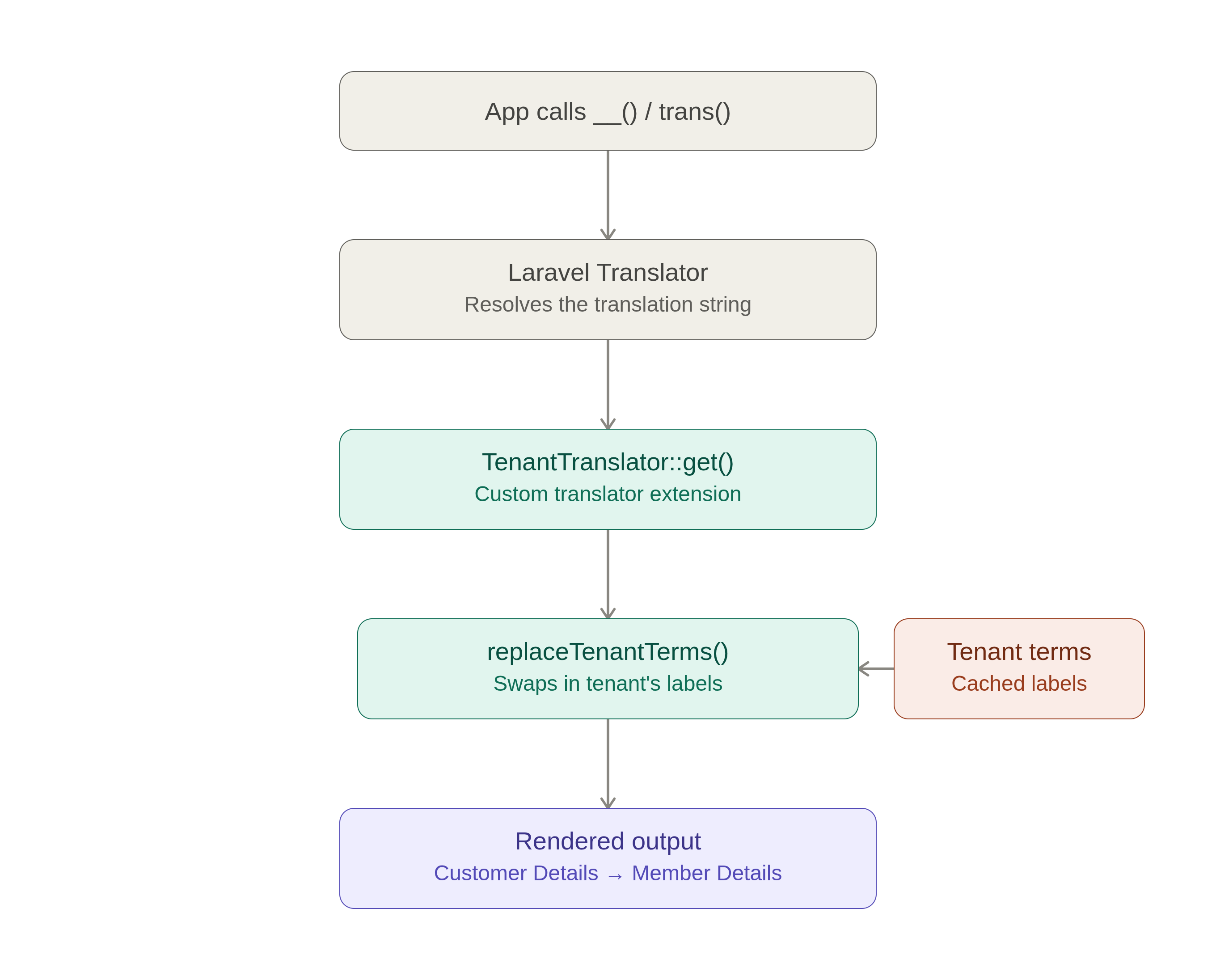
Creating a Custom Translator for Per-Tenant Terminology
Start by extending Laravel’s Translator.
|
1 2 3 4 5 6 7 8 9 10 11 12 13 14 15 16 17 18 19 20 21 22 23 24 25 26 |
namespace App\Translation; use Illuminate\Translation\Translator; class TenantTranslator extends Translator { public function get( $key, array $replace = [], $locale = null, $fallback = true ) { $translated = parent::get( $key, $replace, $locale, $fallback ); if (! is_string($translated)) { return $translated; } return $this->replaceTenantTerms($translated); } } |
Nothing changes in Laravel’s translation process.
The only difference is that every translated string now passes through replaceTenantTerms() before it’s displayed.
That’s where tenant-specific terminology is applied.
Replacing Tenant Terminology
Assume each tenant stores its own terminology.
|
1 2 3 4 |
[ 'Customer' => 'Member', 'Project' => 'Workspace', ] |
The replacement method looks like this:
|
1 2 3 4 5 6 7 8 9 10 11 12 13 14 15 16 17 18 19 20 21 22 23 24 25 26 27 28 29 30 31 32 |
protected function replaceTenantTerms(string $text): string { $tenant = auth()->user()?->tenant; if (! $tenant) { return $text; } $terms = cache()->remember( "tenant:{$tenant->id}:terms", now()->addMinutes(30), fn () => $tenant->terminology ?? [] ); foreach ($terms as $default => $custom) { $escaped = preg_quote($default, '/'); $text = preg_replace_callback( "/\b{$escaped}\b/iu", function ($matches) use ($custom) { $match = $matches[0]; return ctype_upper($match[0]) ? ucfirst($custom) : lcfirst($custom); }, $text ); } return $text; } |
A few things are happening here:
- The current tenant is identified.
- Terminology is loaded from cache.
- Only complete words are replaced.
- Original capitalization is preserved.
Because the replacement happens inside the Translator, every translated string automatically respects the tenant’s terminology.
For example:
Customer Details
becomes
Member Details
without changing any Blade view, Livewire component, or translation file.
Excluding Specific Translation Keys
Not every translation should be modified.
For example, a settings page where administrators configure terminology should continue showing the original labels.
Keep a small list of translation keys that should be ignored.
|
1 2 3 4 |
protected array $excludedKeys = [ 'settings.terminology', 'settings.custom-terms', ]; |
Then skip the replacement before processing the translation.
|
1 2 3 |
if (in_array($key, $this->excludedKeys, true)) { return $translated; } |
This keeps configuration screens predictable while applying tenant terminology everywhere else.
Registering the Custom Translator in Laravel
The final step is telling Laravel to use your custom Translator.
You can do this in AppServiceProvider.
|
1 2 3 4 5 6 7 8 9 10 11 12 13 |
use App\Translation\TenantTranslator; use Illuminate\Translation\Translator; public function register(): void { $this->app->extend( Translator::class, fn ($translator) => new TenantTranslator( $translator->getLoader(), $translator->getLocale(), ) ); } |
Once registered, every translated string flows through your custom Translator before it’s rendered.
That includes:
- Blade views
- Livewire components
- Filament resources
- Validation messages
- Notifications
- Emails
- Package translations
- Custom modules
Developers don’t need to learn anything new; they continue using Laravel’s built-in translation helpers.
Conclusion
Supporting tenant-specific terminology is a common requirement in multi-tenant applications, but it doesn’t need to complicate your codebase.
Extending Laravel’s Translator keeps terminology replacement in one place without changing Laravel’s localization workflow.
Because the replacement happens in the Translator, it works everywhere translations are used, from Blade views to emails and package translations.
In Laravel or Bagisto applications, this approach lets tenants use their own business terminology without changing UI or business logic.
Hire Laravel developers for custom solutions and explore more Bagisto extensions on the official website.


Be the first to comment.