HTTP QUERY Method in Laravel
QUERY is a new HTTP method. The IETF published it as RFC 10008 in June 2026
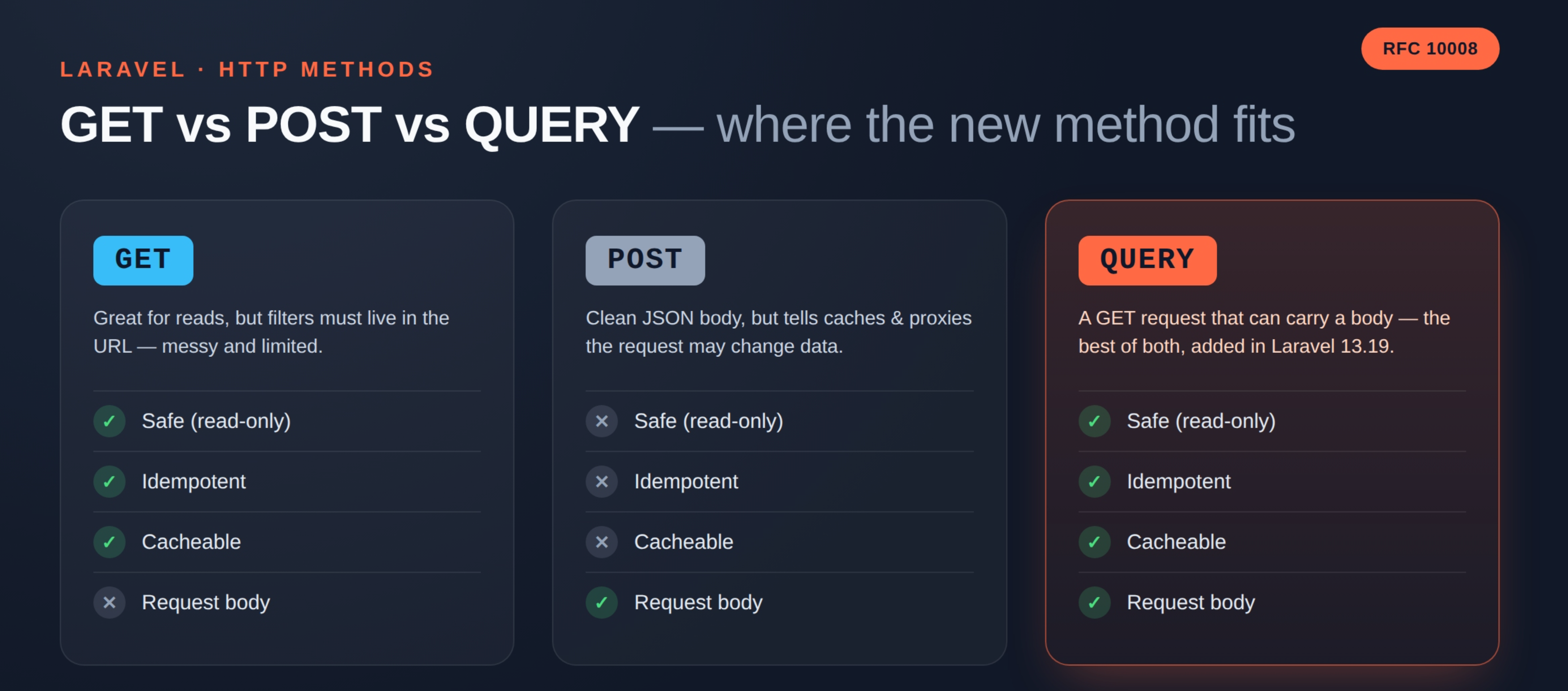
In short, the HTTP QUERY method in Laravel is a GET request that can carry a body.
It has three key traits:
- Safe. It only reads data. It never changes anything on the server.
- Idempotent. You can send it ten times. The result stays the same.
- Cacheable. A proxy or CDN can store the response, just like a GET response.
Because of this, QUERY sits right between GET and POST. You get the body of POST and the promises of GET.
Why Do We Even Need It?
Think about a product search page in an online store. A shopper picks a brand, a price range, five colours, three sizes, and a sort order.
Today you have two choices. Both hurt.
Option 1: GET With a Long URL
You push every filter into the query string. The URL grows fast:
|
1 |
GET /api/products?brand=nike&color[]=red&color[]=blue&color[]=black&size[]=s&size[]=m&price_min=500&price_max=9000&sort=price_asc |
This works for small filters. However, servers and browsers limit URL length.
Nested filters also look ugly in a URL. Worse, the full filter set lands in your access logs.
Option 2: POST With a Clean Body
So most teams switch to POST
|
1 |
POST /api/products/search |
The body is clean and easy to read. But now you have a new problem. POST tells every proxy, cache, and client that the request may change data.
As a result, nothing gets cached. Retries also feel risky, even though you are only reading.
Option 3: QUERY
QUERY fixes both problems at once
|
1 2 3 4 5 6 7 8 9 |
QUERY /api/products Content-Type: application/json { "brand": "nike", "color": ["red", "blue", "black"], "size": ["s", "m"], "price": { "min": 500, "max": 9000 }, "sort": "price_asc" } |
The body stays clean. The request stays safe. Caches can still store the answer.
Where Laravel Stands Today
Laravel 13.19 added support for this method. Symfony 7.4 added it first, so Laravel could build on top of it.
Here is what you get right now
Http::query()in the HTTP client$this->query()and$this->queryJson()in testsRoute::match(['QUERY'], ...)for your routes
A dedicated Route::query() helper is still open as a pull request. Until it lands, Route::match() does the same job.
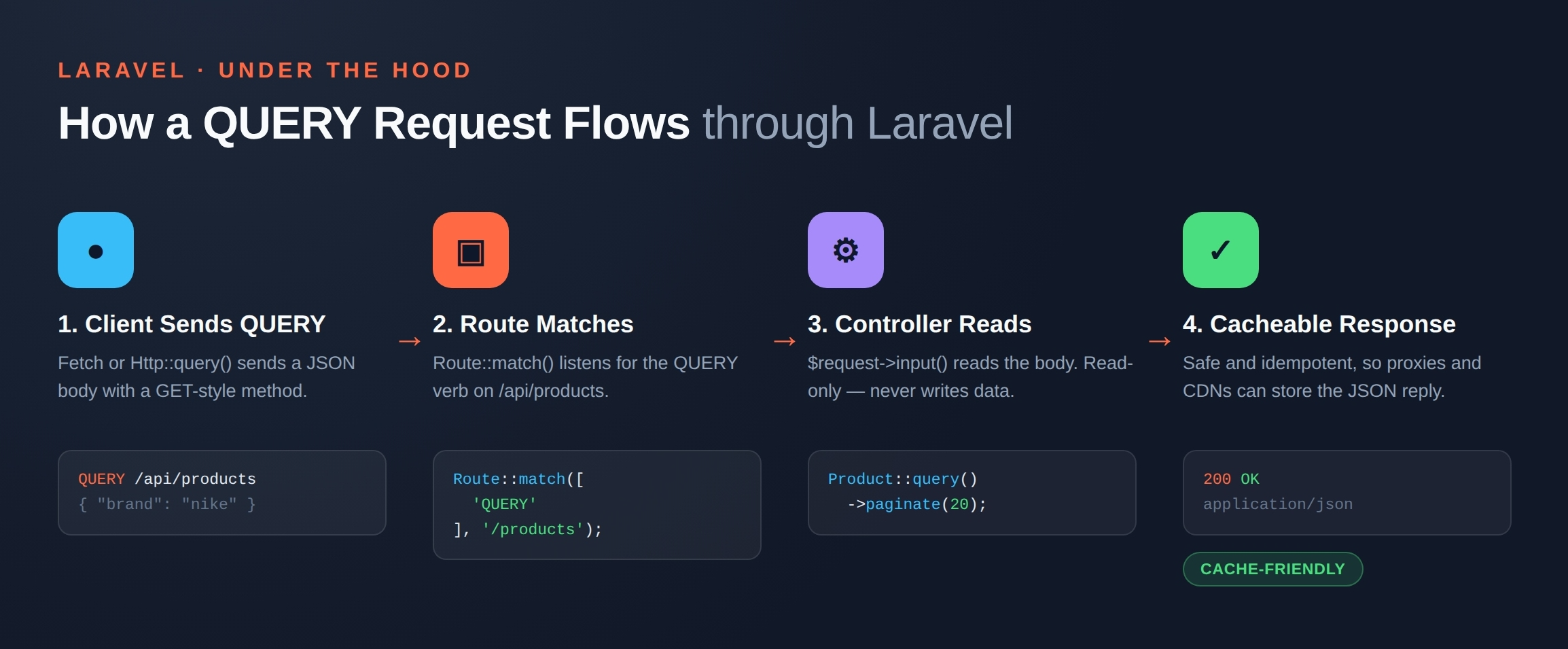
Here is how a request using the HTTP QUERY method in Laravel travels from the client to a cacheable response:
Step 1: Register a QUERY Route
Open routes/api.php and add this
|
1 2 3 4 |
use App\Http\Controllers\Api\ProductSearchController; use Illuminate\Support\Facades\Route; Route::match(['QUERY'], '/products', ProductSearchController::class); |
That is all. Laravel now listens for QUERY calls on /api/products.
Step 2: Read the Body in Your Controller
The body works just like a POST body. So $request->input() reads it without any extra setup.
|
1 2 3 4 5 6 7 8 9 10 11 12 13 14 15 16 17 18 19 20 21 22 23 24 25 26 27 |
namespace App\Http\Controllers\Api; use App\Models\Product; use Illuminate\Http\Request; class ProductSearchController extends Controller { public function __invoke(Request $request) { $filters = $request->validate([ 'brand' => ['nullable', 'string'], 'color' => ['nullable', 'array'], 'price.min' => ['nullable', 'integer', 'min:0'], 'price.max' => ['nullable', 'integer', 'min:0'], 'sort' => ['nullable', 'in:price_asc,price_desc,newest'], ]); $products = Product::query() ->when($filters['brand'] ?? null, fn ($query, $brand) => $query->where('brand', $brand)) ->when($filters['color'] ?? null, fn ($query, $colors) => $query->whereIn('color', $colors)) ->when($filters['price']['min'] ?? null, fn ($query, $min) => $query->where('price', '>=', $min)) ->when($filters['price']['max'] ?? null, fn ($query, $max) => $query->where('price', '<=', $max)) ->paginate(20); return response()->json($products); } } |
Notice one rule. Your controller must only read. Never create, update, or delete inside a QUERY route.
Otherwise you break the contract, and caches will serve stale or wrong data.
Step 3: Call the API From Laravel
Laravel’s HTTP client now ships a query() method. It sends JSON by default:
|
1 2 3 4 5 6 7 8 9 |
use Illuminate\Support\Facades\Http; $response = Http::query('https://shop.test/api/products', [ 'brand' => 'nike', 'color' => ['red', 'blue'], 'sort' => 'price_asc', ]); $products = $response->json(); |
Do you need form data instead? Then chain asForm():
|
1 2 3 |
$response = Http::asForm()->query('https://shop.test/api/products', [ 'brand' => 'nike', ]); |
Step 4: Call It From JavaScript
The Fetch API accepts any method name. So the front end stays simple:
|
1 2 3 4 5 6 7 8 9 10 11 12 13 |
const response = await fetch('/api/products', { method: 'QUERY', headers: { 'Content-Type': 'application/json', 'Accept': 'application/json', }, body: JSON.stringify({ brand: 'nike', color: ['red', 'blue'], }), }); const products = await response.json(); |
Step 5: Write a Test
Laravel gives you two helpers for this. Use queryJson() for JSON APIs:
|
1 2 3 4 5 6 7 8 |
it('filters products by brand', function () { Product::factory()->create(['brand' => 'nike']); Product::factory()->create(['brand' => 'puma']); $this->queryJson('/api/products', ['brand' => 'nike']) ->assertOk() ->assertJsonCount(1, 'data'); }); |
Things to Watch Out For
QUERY is new. Therefore a few pieces of the stack still need to catch up.
Old proxies may block it. Some load balancers and firewalls only allow a fixed list of methods. Check your Nginx, CDN, and WAF rules first.
Browsers are still catching up. Fetch works fine. Native form submits do not support QUERY yet.
Caching needs the body. A normal cache key uses the URL only.
For QUERY, the cache key must include the request body. Please confirm this before you turn caching on.
Keep a fallback. Many public clients cannot send QUERY today. So keep your POST endpoint alive for a while. You can drop it later.
Should You Use It Now?
Start with internal APIs. Your own mobile app, your admin panel, or a service-to-service call all fit well. You control both sides, so nothing breaks.
Wait a bit longer for public APIs. Third-party clients need time to adapt.
Final Thoughts
QUERY solves an old, annoying problem cleanly. For years we forced search into POST and lost caching. Now we have a proper method for reads with a body.
Laravel already supports it. Start with one search endpoint, test it well, and grow from there.

Be the first to comment.