Bagisto introduces Magic AI, a built-in AI layer that enables features like product description generation, image creation, and visual search.
It also powers review translation and personalized checkout messages, bringing AI directly into the eCommerce workflow.
The Need for Magic AI
Laravel AI SDK abstracts communication with multiple AI providers through a unified API.
Magic AI adds provider configuration and prompt orchestration tailored for Bagisto.
It seamlessly integrates AI-powered features across products, categories, CMS pages, and SEO.
Key Architectural Decisions
1. Every Model Is a Typed Enum
Instead of storing model names in config arrays, Bagisto represents every AI model as a PHP enum case implementing AiModelContract:
Each provider has its own enum containing all its models. Here’s how OpenAI implements it:
1 2 3 4 5 6 7 8 9 10 11 12 13 14 15 16 17 18 19 20 21 22 23 24 |
enum OpenAiModel: string implements AiModelContract { // Text models case GPT52 = 'gpt-5.2'; case GPT41 = 'gpt-4.1'; // ... more text models // Image models case GptImage15 = 'gpt-image-1.5'; case GptImage1 = 'gpt-image-1'; public function provider(): Lab { return Lab::OpenAI; } public function isImageModel(): bool { return match ($this) { self::GptImage15, self::GptImage1 => true, default => false, }; } } |
2. A Single-Array Provider Registry
The AiProvider class maps every provider to its model enum in one array.
AiProvider auto-generates everything the admin UI needs: provider dropdowns, model selectors (prefixed as “OpenAI: GPT-4.1”), and filtered lists.
|
|
interface AiModelContract { public function provider(): Lab; // Which SDK provider public function label(): string; // Display name for admin UI public function isImageModel(): bool; // Can generate images? public function isTextModel(): bool; // Can generate text? } |
|
|
private static array $providers = [ ['provider' => Lab::OpenAI, 'label' => 'OpenAI', 'model_enum' => OpenAiModel::class], ['provider' => Lab::Gemini, 'label' => 'Gemini', 'model_enum' => GeminiModel::class], ['provider' => Lab::Anthropic, 'label' => 'Anthropic', 'model_enum' => AnthropicModel::class], // ...more entries, same pattern ]; |
3. Model-First Provider Resolution
Most AI wrappers ask: “Which provider? OK, now which model?”
Magic AI approaches the problem from the opposite direction. Instead of starting with a provider, the selected model determines which provider should be used.
Once resolved, the corresponding API credentials are loaded, and the request is passed to the SDK.
|
|
// Resolve the model string to its enum case $modelEnum = AiProvider::resolveModel('gpt-4.1'); // → OpenAiModel::GPT41 $provider = $modelEnum->provider()->value; // → 'openai' // Inject the admin-stored API key into Laravel AI's runtime config $apiKey = core()->getConfigData("magic_ai.providers.{$provider}.api_key"); config(["ai.providers.{$provider}.key" => $apiKey]); // Now call the SDK — it has the right credentials agent()->prompt($prompt, provider: $provider, model: 'gpt-4.1') |
Five eCommerce Features, One Pattern
Magic AI powers five AI-driven features across Bagisto, from content generation to visual search.
Despite their different use cases, they all follow the same pattern: build a prompt, select a provider, and execute the request through Laravel AI.
|
|
// Product & CMS Content Generation agent()->prompt($contentPrompt); // Product Image Generation Image::of($imagePrompt); // Search by Image agent() ->withAttachment($uploadedImage) ->prompt($analysisPrompt); // Review Translation agent()->prompt("Translate to {$locale}: {$review}"); // Personalized Checkout Messages agent()->prompt(buildCheckoutPrompt($order)); |
Before & After: AI-Generated Product Description
Storefront Integration
The Shop package is integrated with simple feature checks. Both follow the same pattern: check the feature toggle before calling Magic AI.
|
|
// SearchController — Image Search if (core()->getConfigData('magic_ai.storefront_features.image_search.enabled')) { $keywords = magic_ai()->analyzeImage($uploadedImagePath); // Feed keywords into product search... } // OnepageController — Checkout Message if (core()->getConfigData('magic_ai.storefront_features.checkout_message.enabled')) { $message = magic_ai()->checkoutMessage($order); } |
How to Add a New AI Provider
Adding a new provider requires two changes:
Step 1: Create a Model Enum
Create a new PHP enum inside Enums/Models/ implementing AiModelContract:
|
|
enum NewProviderModel: string implements AiModelContract { case ModelA = 'new-provider-model-a'; case ModelB = 'new-provider-model-b'; public function provider(): Lab { return Lab::NewProvider; } public function label(): string { /* ... */ } public function isImageModel(): bool { /* ... */ } public function isTextModel(): bool { return !$this->isImageModel(); } public static function defaultTextModel(): ?static { return self::ModelA; } public static function defaultImageModel(): ?static { return null; } } |
Step 2: Register in AiProvider
Add one line to the $providers array: The admin UI auto-populates, the API key config field appears, and credential injection works automatically.
No controller changes, no route changes, no migration.
|
|
['provider' => Lab::NewProvider, 'label' => 'New Provider', 'model_enum' => NewProviderModel::class], |
Behind the Scenes: Magic AI Architecture
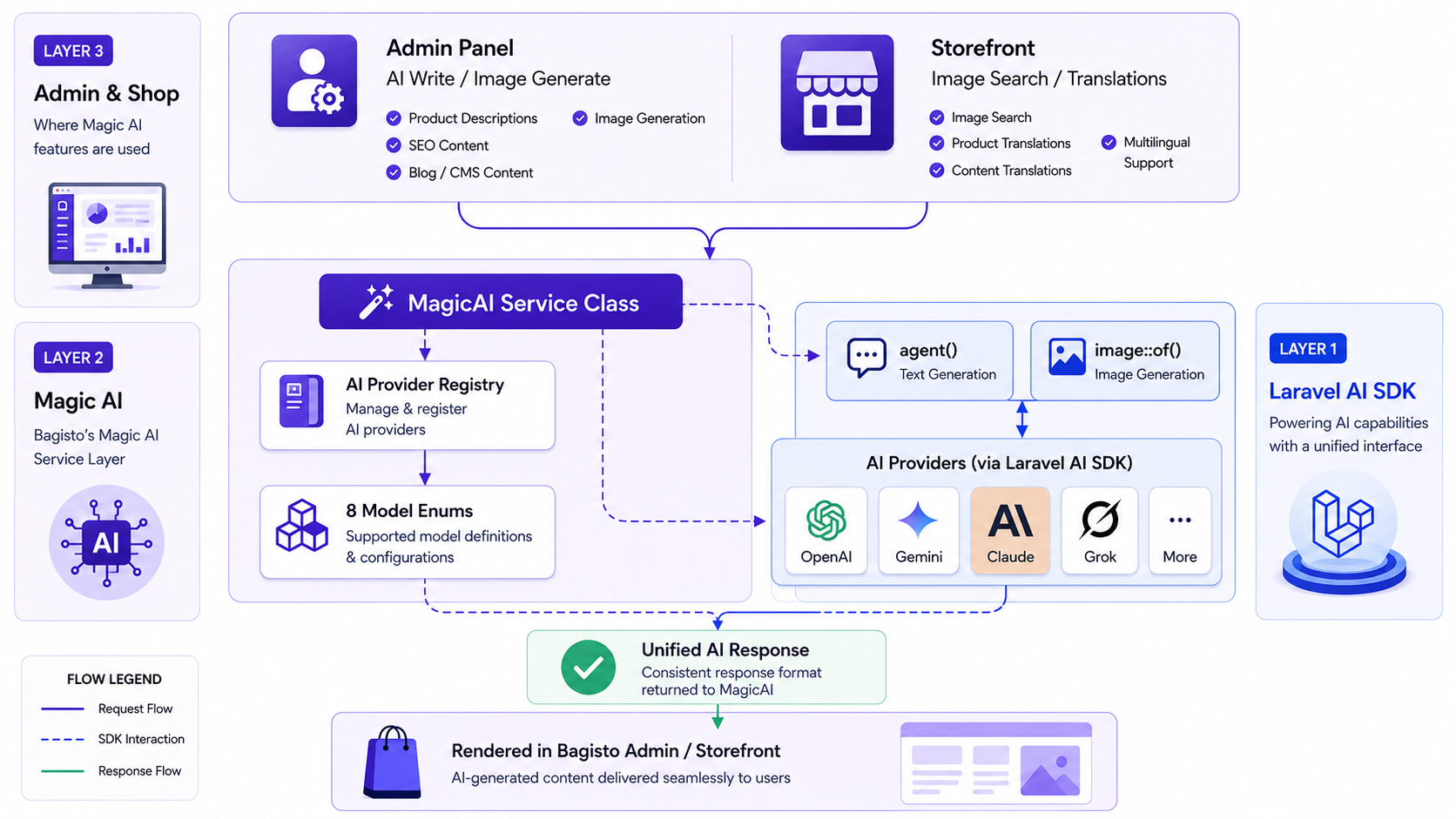
Magic AI
Conclusion
Bagisto’s Magic AI demonstrates a clean pattern for building framework-native AI integrations:
-
Foundation – Laravel AI SDK provides agent() and Image::of()
-
Abstraction – Magic AI wraps them with eCommerce features and model-first provider resolution
-
Configuration – The admin panel gives non-developers a GUI to manage everything
The architecture is worth studying beyond eCommerce.
Laravel applications can support multiple AI providers using enum registries and runtime injection, avoiding hard-coded credentials and vendor lock-in.
You can also explore our Bagisto Extensions. If you are planning to build with Laravel, consider hiring laravel developers.
. . .


Be the first to comment.