Bagisto Exchange Rates allows you to automatically update currency exchange rates using external API services.
From the admin panel, you can easily add API credentials, select your preferred service provider, and set up a schedule for automatic updates.
This helps keep your store’s currency rates accurate without manual effort.
To configure exchange rates, go to: Configuration > General > Exchange Rates. as shown in the image below.
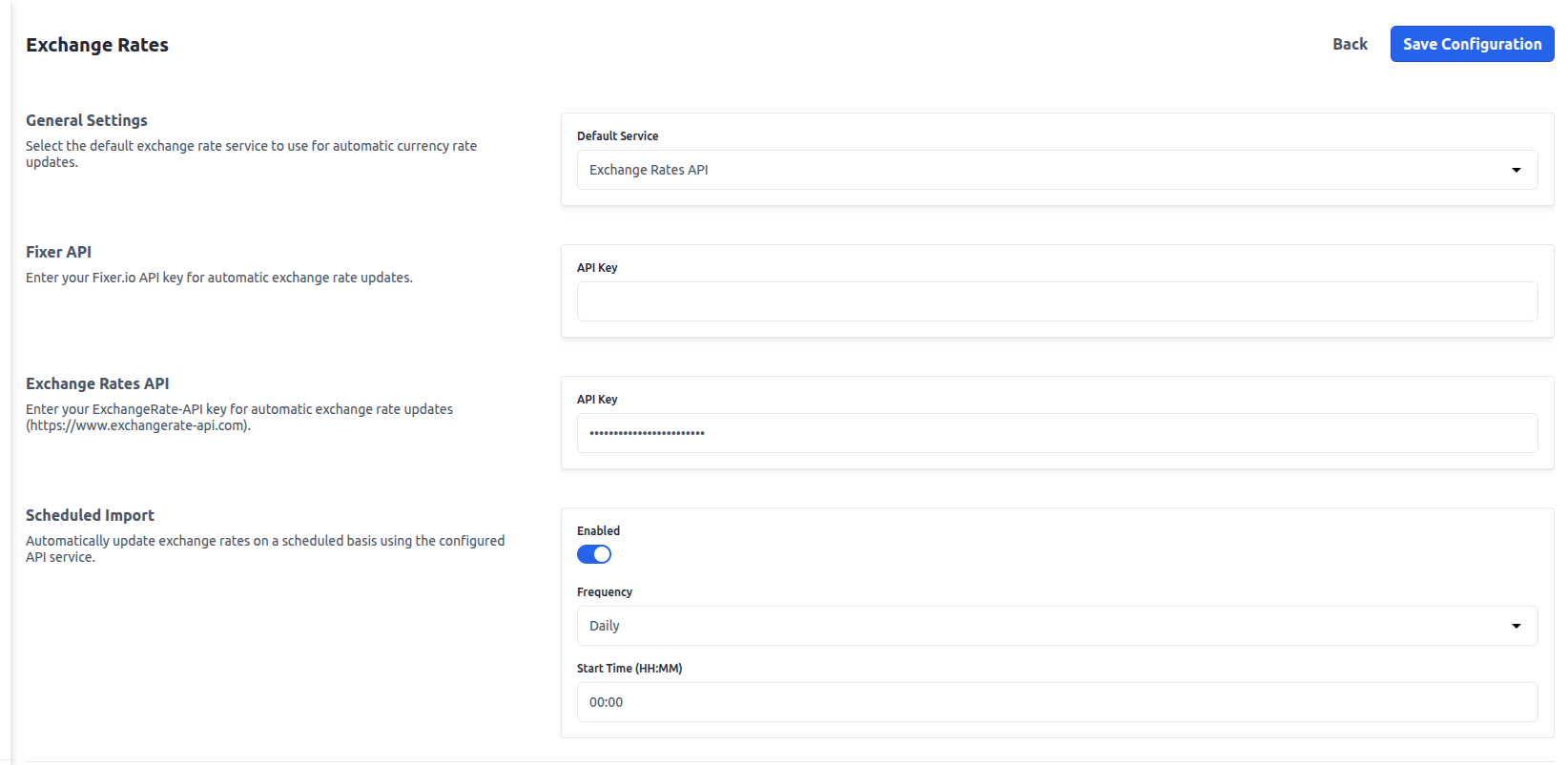
Exchange Rates Configurations
Below are the detailed steps of the exchange rates configurations.
1) General Settings
In this section, you can choose the default exchange rate service that Bagisto will use.
You can select between Exchange Rates API and Fixer API, depending on your preference and usage needs.
2) Fixer API
Here, you need to enter the API key obtained from fixer.io.
Fixer provides both real-time and historical exchange rate data. It also offers a free plan, but the number of API requests is limited.
3) Exchange Rates API
In this section, you need to add your API key from exchangerate-api.com. This service provides real-time exchange rates for more than 160 currencies.
The free plan allows up to 1,500 requests per month, making it suitable for most small to medium stores.
4) Scheduled Import
You can enable scheduled updates to automatically refresh exchange rates at regular intervals.
Once enabled, you can choose the update frequency — daily, weekly (every Monday), or monthly (on the 1st day of the month).
You can easily add this from the configurations as shown below.

You also need to set the start time in 24-hour format, for example 03:00.
For scheduled updates to work properly, make sure the Laravel task scheduler is running.
You can run it using the command: php artisan schedule:work

Environment Variable Fallback
If you do not enter API keys in the admin panel, Bagisto will automatically use the API keys defined in your .env file.
For Fixer API, you can set FIXER_API_KEY.
For Exchange Rates API, you can set EXCHANGE_RATES_API_KEY.
Example .env configuration:
FIXER_API_KEY=your_fixer_api_key_here
EXCHANGE_RATES_API_KEY=your_exchange_rates_api_key_here
Manual Update
Apart from automatic updates, you can also update exchange rates manually.
From the admin panel, go to Settings > Exchange Rates and click on the Update Rates button.
You can also run the command in CLI: php artisan exchange-rate:update
Exchange Rates API (exchangerate-api.com) –
-Endpoint: https://v6.exchangerate-api.com/v6/{API_KEY}/latest/{BASE}
– Fetches all currency rates in a single API call
– Free tier: 1,500 requests/month
– Sign up: [https://www.exchangerate-api.com](https://www.exchangerate-api.com)
Supported Services
Bagisto Exchange Rates API (exchangerate-api.com)
This service fetches all currency exchange rates in a single API call. It allows 1,500 free requests per month.
Fixer API (fixer.io)
– Endpoint: http://data.fixer.io/api/{date}
– Fetches rates per currency pair
– Free tier: 100 requests/month
– Sign up: [https://fixer.io](https://fixer.io)
Conclusion
By configuring exchange rate services in Bagisto, you can ensure that your store always displays accurate and up-to-date currency values.
With options to choose your preferred API provider, schedule automatic updates.



Be the first to comment.