Bagisto Multi-Guard Authentication Explained
Have you ever wondered how Bagisto allows an administrator to manage the store from the admin panel while customers shop on the storefront—without their sessions interfering with each other?
The answer is Laravel’s Multi-Guard Authentication. It allows different types of users to authenticate independently within the same application.
In this article, you’ll learn what a guard is, how Bagisto implements multi-guard authentication, why admin and customer sessions never conflict, how to extend it with your own custom guards, and the best practices to follow when building your own Bagisto modules.
What is a Guard in Laravel?
A guard in Laravel determines how a user is authenticated for every request. It tells Laravel which authentication method to use and where to retrieve the authenticated user.
Laravel supports multiple authentication guards, allowing an application to manage different types of users independently.
For example, a web application may have:
| Guard | Purpose |
|---|---|
customer |
Authenticates storefront customers |
admin |
Authenticates administrators |
Each guard has its own authentication flow, making it possible for multiple user types to coexist securely in the same application.
What is Multi-Guard Authentication?
Multi-Guard Authentication means using multiple guards within a single Laravel application.
Instead of authenticating every user from the same table and session, each guard has its own:
- Authentication process
- User model
- Database table
- Session data
- Password reset flow
Bagisto uses this approach to completely separate customers from administrators while running both interfaces within the same Laravel application.
How Bagisto Configures Authentication
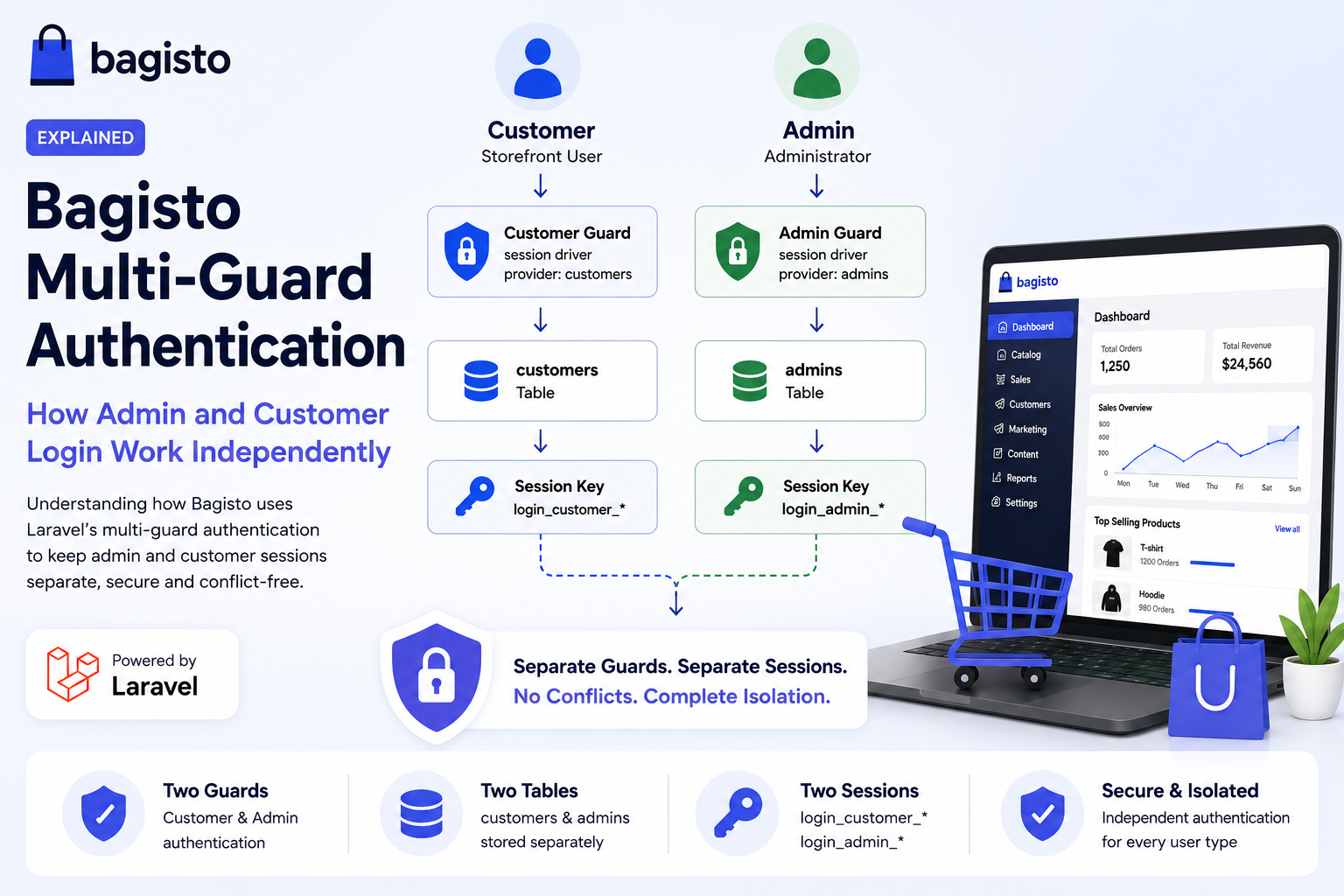
Bagisto defines two session-based guards inside config/auth.php.
|
1 2 3 4 5 6 7 8 9 10 11 |
'guards' => [ 'customer' => [ 'driver' => 'session', 'provider' => 'customers', ], 'admin' => [ 'driver' => 'session', 'provider' => 'admins', ], ]; |
Each guard is linked to its own provider, allowing Bagisto to authenticate administrators and customers independently.
| Guard | Model | Database Table |
|---|---|---|
customer |
Customer | customers |
admin |
Admin | admins |
Two guards, two providers, two models, two tables, two reset flows. Complete isolation by design.
This separation ensures both user types remain completely isolated.
Why Admin and Customer Sessions Never Conflict
Although both guards use Laravel’s session driver, Laravel stores each authenticated user under a unique session key derived from the guard name.
|
1 2 |
login_customer_<hash> => 42 // a logged-in customer login_admin_<hash> => 7 // a logged-in admin |
Because the session keys are different strings, they live side by side in the same session payload:
- An admin and customer can stay logged in at the same time in the same browser.
- Logging out as an admin clears only
login_admin_*— the customer session survives untouched. - Checking
auth()->guard('admin')->check()inspects only the admin key; it knows nothing about the customer key.
This is the mechanical answer to “how do two panels coexist without conflict”: different guards write to different session keys.
Where the Login Logic Actually Lives
Notice how each side authenticates against its own guard explicitly. Here’s what a simplified admin login attempt looks like:
|
1 2 3 4 5 6 7 8 9 10 11 |
// Admin SessionController — always names the 'admin' guard if (! auth()->guard('admin')->attempt($credentials)) { return redirect()->back()->withErrors([ 'email' => trans('admin::app.errors.invalid-credentials'), ]); } // After success, admins are additionally checked for ACL permission if (! bouncer()->hasPermission('dashboard')) { auth()->guard('admin')->logout(); } |
And the customer side does the mirror image:
|
1 2 3 4 5 6 |
// Shop SessionController — always names the 'customer' guard if (! auth()->guard('customer')->attempt($credentials)) { return redirect()->back()->withErrors([ 'email' => trans('shop::app.errors.invalid-credentials'), ]); } |
Route Protection with Middleware
Guards decide how to authenticate; middleware decides which routes require it. Bagisto registers two aliases inside its service providers (not the global HTTP kernel):
Then each package wraps its protected routes in the matching middleware:
|
1 2 3 4 5 6 7 8 9 10 11 12 13 14 |
// Admin routes — guarded by the 'admin' middleware (Bouncer) Route::group([ 'middleware' => ['admin', NoCacheMiddleware::class], 'prefix' => config('app.admin_url'), ], function () { // dashboard, catalog, orders, settings... }); // Storefront account routes — guarded by the 'customer' middleware Route::group([ 'middleware' => ['customer', NoCacheMiddleware::class], ], function () { // profile, addresses, wishlist, logout... }); |
- The customer middleware authenticates storefront users, while the admin middleware authenticates administrators and validates their ACL permissions.
This ensures customers cannot access admin routes, while administrators don’t automatically become authenticated customers on the storefront.
Authentication Flow
Customer Login
|
1 2 3 4 5 6 7 8 9 10 11 12 13 14 15 16 |
Customer Login │ ▼ Customer Guard │ ▼ Customer Provider │ ▼ Customers Table │ ▼ login_customer_* │ ▼ Customer Dashboard |
Admin Login
|
1 2 3 4 5 6 7 8 9 10 11 12 13 14 15 16 |
Admin Login │ ▼ Admin Guard │ ▼ Admin Provider │ ▼ Admins Table │ ▼ login_admin_* │ ▼ Admin Dashboard |
Even though both users share the same browser session, Laravel keeps their authentication completely separate.
Adding a Third Guard (For Your Own Module)
Because this is just Laravel, you can extend it. Suppose your module needs a third audience — say authors who are neither shop admins nor customers. You’d add a new guard named after that audience (call it author, or anything that fits your use case) as a full stack in config/auth.php:
|
1 2 3 4 5 6 7 8 9 10 11 12 13 14 15 |
'guards' => [ // ...existing customer and admin guards... 'author' => [ 'driver' => 'session', 'provider' => 'authors', ], ], 'providers' => [ // ... 'authors' => [ 'driver' => 'eloquent', 'model' => Webkul\Author\Models\Author::class, ], ], |
Then use it exactly like the others:
|
1 2 3 |
if (auth()->guard('author')->attempt($credentials)) { return redirect()->route('author.dashboard'); } |
Laravel gives this new guard its own login_author_* session key automatically — so it coexists with customers and admins, conflict-free, following the identical pattern. Whatever audience you need, just name a new guard for it and follow the same structure.
Best Practices
When developing Bagisto modules:
- Always specify the guard explicitly using
auth()->guard('admin')orauth()->guard('customer'). Relying on the default guard inside a package is a subtle bug waiting to happen when that code runs on the “wrong” side. - Keep models, tables, and password brokers separate per audience — never authenticate two audiences against one table.
- Protect routes with middleware, not controller checks. Wrap route groups in the
adminorcustomermiddleware so authorization is declarative and consistent.
Common Mistakes
Avoid these common mistakes when working with multiple guards:
- Forgetting to name the guard. Calling
auth()->user()in admin code returns the customer (the default guard) ornull— leading to confusing “I’m logged in but the app says I’m not” bugs. - Storing admins and customers in the same database table. This collapses the isolation, creates security risk, and breaks Bagisto’s ACL model.
- Assuming logout is global.
auth()->guard('admin')->logout()signs out only the admin. If you intend to end all sessions, you must log out each guard (or invalidate the session entirely).
Conclusion
Bagisto leverages Laravel’s Multi-Guard Authentication to provide secure, independent authentication for administrators and customers within the same application.
By separating guards, providers, models, and session keys, Bagisto ensures both user types can work simultaneously without interfering with each other’s sessions. Middleware like AuthenticateCustomer and Bouncer then decide which routes each identity may enter, with the admin side adding ACL permission checks on top.
Understanding this architecture not only helps you troubleshoot authentication issues but also enables you to build secure and scalable Bagisto modules that follow Laravel’s best practices.
You can also hire laravel developers to build custom solutions on Laravel. To explore ready-made add-ons, visit the Bagisto extension marketplace.


Be the first to comment.