Email notifications help eCommerce stores keep customers informed about important activities such as orders, account updates, and password resets.
They also enable timely communication through shipping updates, confirmations, and other essential store email notifications.
In this guide, you will learn how to configure Gmail SMTP in Bagisto and send emails securely using your Gmail account.
Why Use Gmail SMTP in Bagisto?
Gmail SMTP is a reliable way to send emails from your Bagisto store. It helps ensure that important notifications reach your customers without any issues.
Previously, users could enable the Less Secure Apps option in Gmail and use their account password for SMTP authentication.
However, Google has discontinued this feature to improve account security.
To send emails through Gmail now, you must:
- Enable 2-Step Verification on your Google account.
- Generate a Google App Password.
- Use the App Password instead of your Gmail account password.
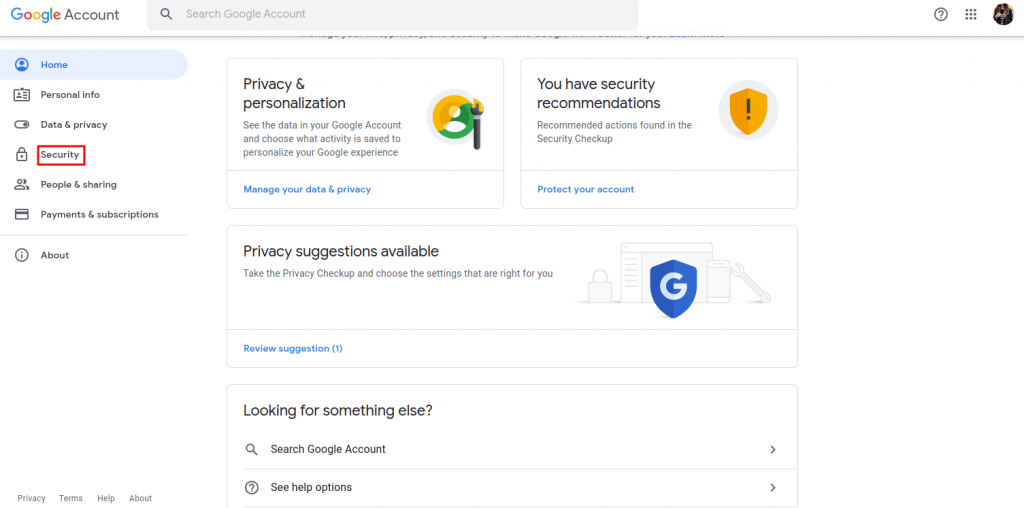
Step 1: Open Google Account Security Settings
1) Sign in to your Gmail account.
2) Open your Google Account settings.
3) Click on the Security tab from the left menu.

Step 2: Enable 2-Step Verification
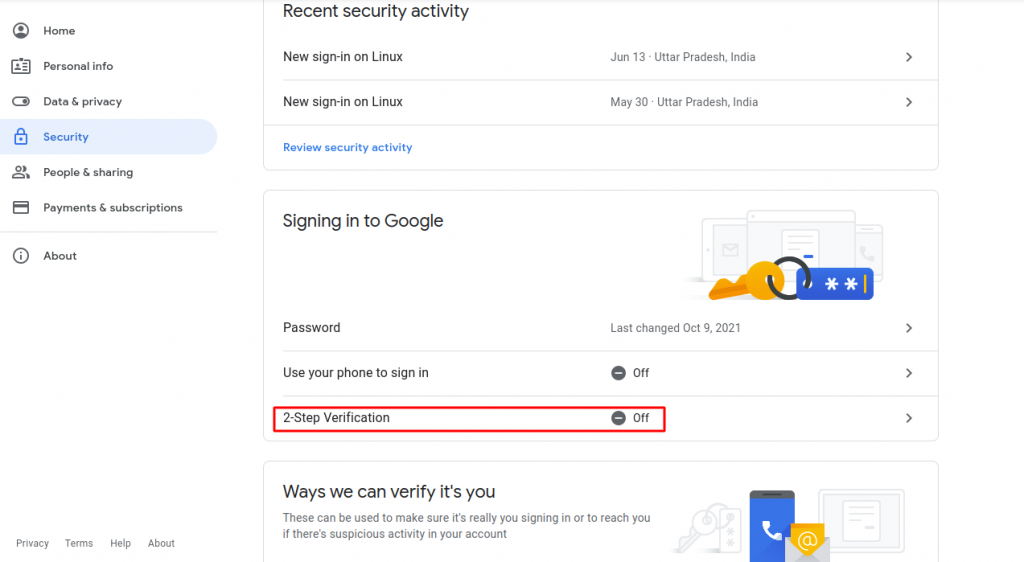
1)Under the Signing in to Google section, click 2-Step Verification.
2)Follow the on-screen instructions.
3)Complete the setup process.

Step 3: Generate a Google App Password
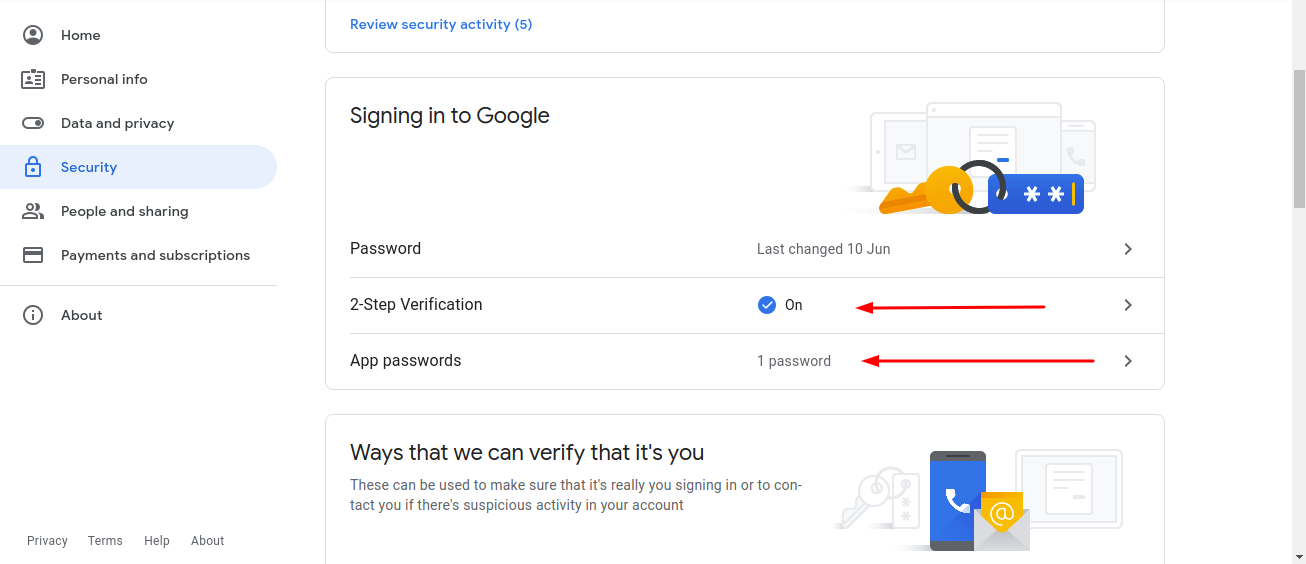
1)Return to the Security section of your Google Account.
2)Click App Passwords.
3)Verify your identity if prompted.

Step 4: Create a New App Password
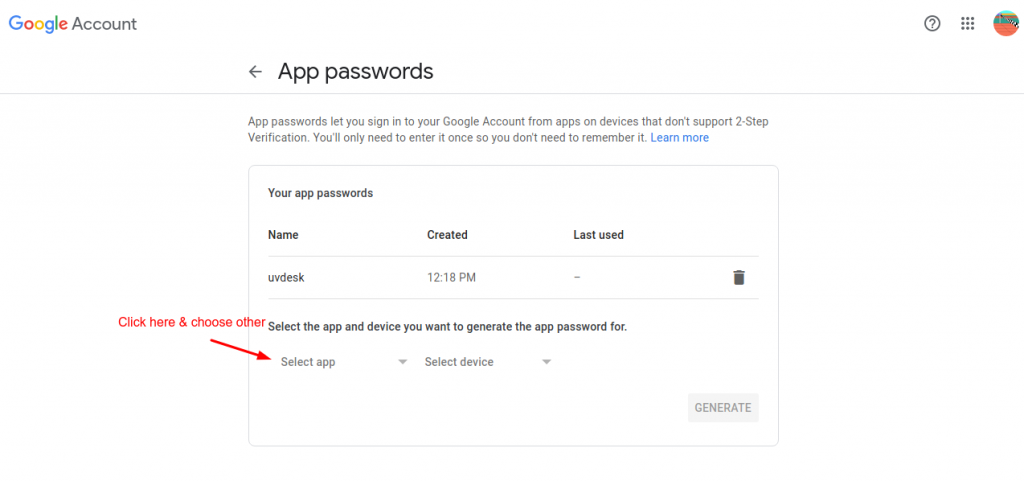
1)Click the Select App dropdown.Lead Generation activities:
2)Choose Other (Custom Name).
3)Enter a name such as Bagisto SMTP.
4)Click Generate.
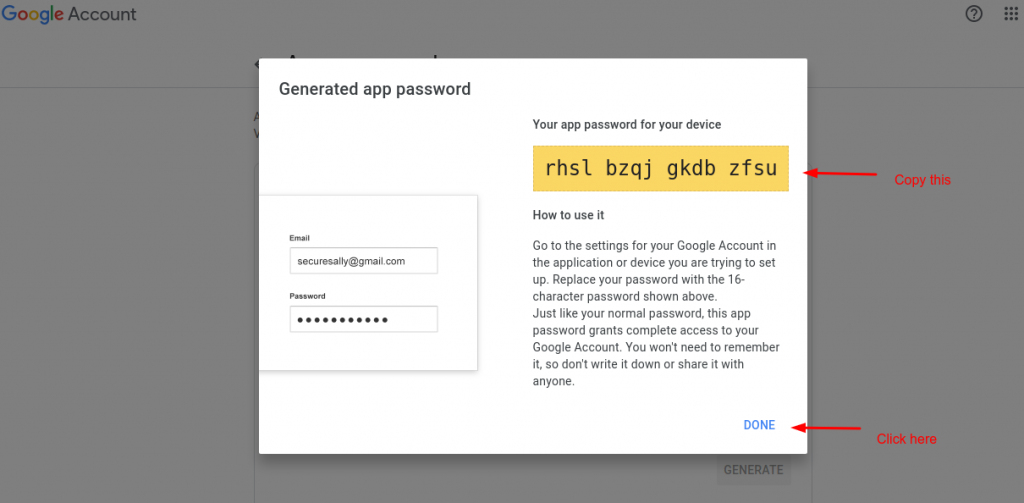
Google will generate a unique 16-character App Password

Step 5: Copy the App Password
Copy the generated password and store it safely.
Important: Google displays the App Password only once. Make sure to save it before closing the window.

Step 6: Configure Gmail SMTP in Bagisto
Open the .env file of your Bagisto project and update the mail settings as shown below:
|
1 2 3 4 5 6 7 8 9 10 11 12 13 |
MAIL_MAILER=smtp MAIL_HOST=smtp.gmail.com MAIL_PORT=467 MAIL_USERNAME=store@gmail.com MAIL_PASSWORD=<Your_App_Pasword> MAIL_ENCRYPTION=ssl SHOP_MAIL_FROM=store@gmail.com |
Configuration Overview
| Parameter | Description |
| MAIL_MAILER | Defines the mail driver used by Laravel |
| MAIL_HOST | Gmail SMTP server address |
| MAIL_PORT | SMTP port for SSL connection |
| MAIL_USERNAME | Your Gmail email address |
| MAIL_PASSWORD | Generated Google App Password |
| MAIL_ENCRYPTION | SSL encryption method |
| SHOP_MAIL_FROM | Sender email address for store notifications |
Clear Configuration Cache
After updating the .env file, clear the application cache by running:
|
1 |
php artisan config:clear |
|
1 |
php artisan cache:clear |
This ensures that Bagisto loads the latest mail configuration.
Setting up Gmail SMTP in Bagisto is a simple and secure way to send transactional emails from your store.
Since Google has discontinued support for Less Secure Apps, App Passwords are now the recommended method for Gmail SMTP authentication.
Enable 2-Step Verification and use an App Password to securely send store emails and notifications.