Many modern websites run Vue as the main app, but developers still bolt on small pieces of plain JavaScript on top of it — a photo popup, a “read more” toggle, an image slider, a scroll effect. These feel harmless. But on a page that also runs Vue (Bagisto, Inertia, or anything using app.mount(‘#app’)) that small script very often just stops working, with no error to point you toward the cause.
Let’s see why this happens, show you how to prove it in your own browser in under a minute, and resolve to make your plain JavaScript work every time. No deep Vue knowledge required.
Why Plain JavaScript Stops Working After Vue Mounts
Suppose we’re adding a simple photo popup (“lightbox”). Click an image in a gallery, and a bigger version should open. You write the click handler, refresh the page, click the image — nothing happens.
You start debugging:
- Browser console: no red errors.
- Add a console.log inside the click handler: it never prints.
- The image is clearly sitting right there on the page.
So why is the click being ignored entirely?
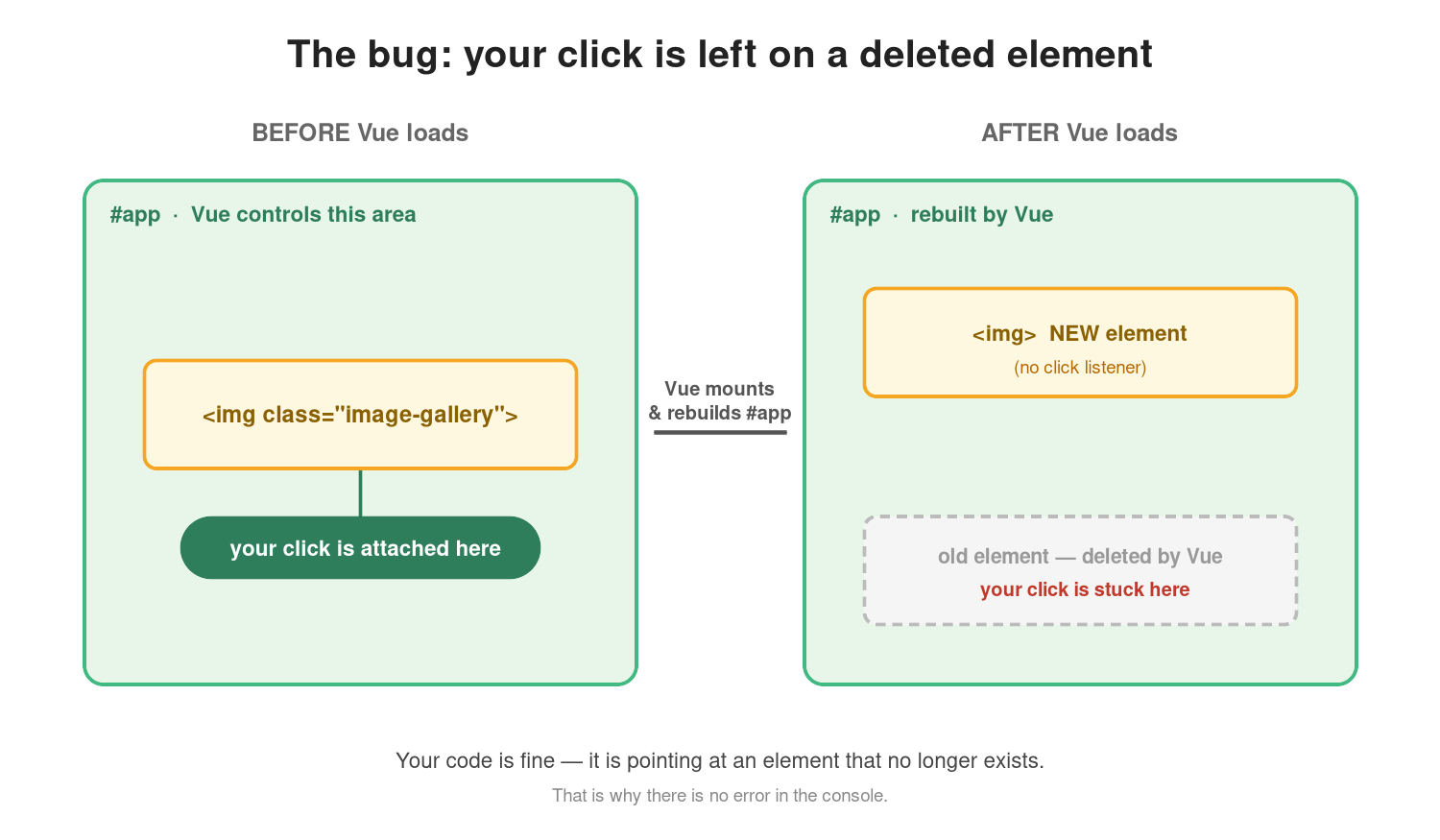
Vue owns everything inside #app. When Vue loads, it rebuilds that entire area and creates brand-new HTML elements. Your click listener was attached to the old element, the one Vue has already deleted and replaced.
Your code was never wrong. It’s simply pointing at an element that no longer exists. That’s also why there’s no error: JavaScript did exactly what you told it to; the target just quietly disappeared underneath it.

How to Prove Vue Replaced Your DOM Elements
Tag an element, attach a listener, then check the element again after Vue finishes loading:
|
1 2 3 4 5 6 |
const el = document.querySelector('.image-gallery'); el.dataset.tag = 'my-element'; el.addEventListener('click', () => console.log('clicked')); // Run this again after Vue has loaded: console.log(document.querySelector('.image-gallery').dataset.tag); // → undefined |
The tag is gone. The element on the page now is a different, newer element, while your click listener is still attached to the old one Vue removed. That single mismatch is the entire bug.
Fixing the Problem: A Vue-Friendly Approach
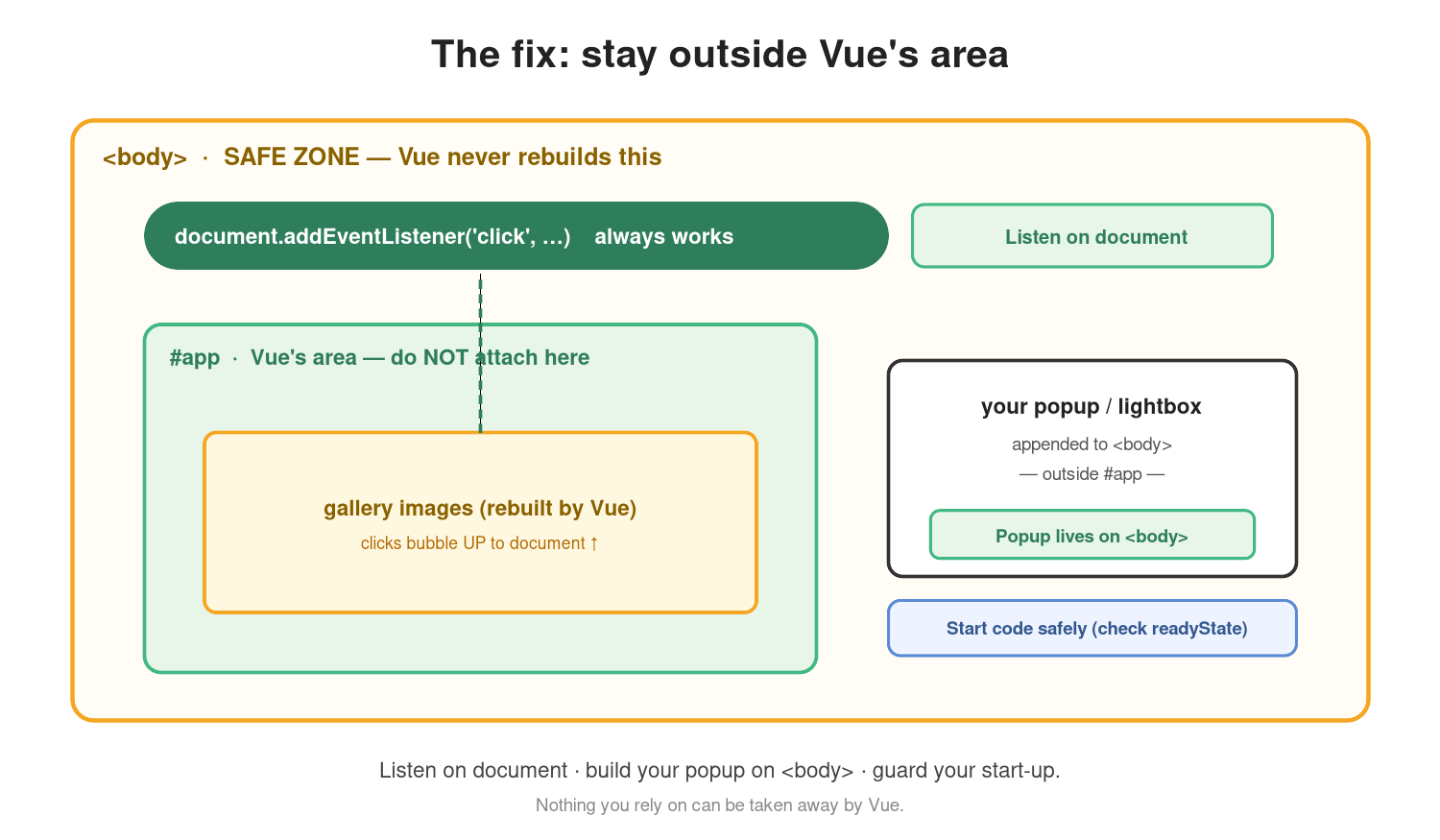
The core principle: never depend on elements that Vue controls. Vue can delete and rebuild them at any moment, so anything attached directly to them is fragile.
1. Listen on “document”, not on the element
document is never rebuilt by Vue. Attach your listener there and simply check which element was clicked, a technique called event delegation.
It works even for elements Vue creates later:
|
1 2 3 4 |
document.addEventListener('click', e => { const img = e.target.closest('.image-gallery img'); if (img) openPopup(img); // works even after Vue rebuilds the gallery }); |
2. Attach new elements to <body> , not inside #app
Vue only rebuilds what lives inside its mount point (#app). If your popup is created in JavaScript and appended directly to <body>, it sits outside Vue’s control; Vue can never delete or move it:
|
1 2 |
const popup = document.createElement('div'); document.body.appendChild(popup); // safe, outside Vue's area |
3. Start your code at the right time
The page and Vue can finish loading in either order. Run too early, and elements may not exist yet; handle it wrong, and your code may never run at all:
|
1 2 3 |
document.readyState === 'loading' ? document.addEventListener('DOMContentLoaded', start) : start(); |
Together, these three rules mean your feature no longer cares when Vue loads or how many times it rebuilds the page. Your listener lives on the document; your popup lives on <body>, and your code starts safely; Vue can take away nothing you rely on.
How We are using it inside Bagisto
This isn’t just theory; it’s a very common situation in Bagisto. Bagisto’s shop and admin themes run Vue mounted on #app, while most of the page markup comes from Blade templates. When you add a custom feature inside a Blade view- a gallery popup, a custom slider, a “quick view” button- you’re placing plain HTML and JavaScript directly inside Vue’s territory. The moment Vue mounts and renders its components, it rebuilds that section, and any listeners bound directly to those elements stop firing. That’s exactly the “works once, then stops” bug so many Bagisto developers run into.
The fix is the same three rules:
- Delegate events on document.
- Build any overlay or modal in JS and append it to <body>
- Guard your start-up code against load-order timing.
Because none of this touches Vue itself, it’s also upgrade-safe; you’re not editing or fighting Bagisto’s core Vue components, just working politely around them.
Conclusion
Treat everything inside #app as Vue’s private space. Don’t attach code to elements inside it, and don’t place your own popups there either. Instead:
- Listen on Document.
- Append new elements to <body>.
- Guard your start-up timing.
Vue can rebuild its own area as often as it likes, but it never touches document or anything you’ve added to <body> yourself. Your listener survives, your popup never disappears, and your start-up code always runs — whether you’re on a plain Laravel + Vue page or deep inside a Bagisto theme.
You can also hire laravel developers to build custom solutions on Laravel. To explore ready-made add-ons, visit the Bagisto extension marketplace.