Understanding the PDF Asset Loading Issue
While working on the Marketplace module, we encountered a strange issue related to PDF invoice and transaction PDF generation (Laravel PDF Asset Loading).
The company logo was embedded directly into the PDF using Base64 encoding :
|
1 |
<img src="data:image/png;base64,{{ base64_encode(file_get_contents(bagisto_asset('images/logo.svg'))) }}"/> |
Interestingly, the issue only appeared when the application was running with a single PHP worker (php artisan serve).
However, when multiple workers were available (PHP_CLI_SERVER_WORKERS=4 php artisan serve) and served through a production-grade web server.
PDF generation worked without any visible problems.
After debugging, the root cause was identified as how the image file was being accessed during PDF rendering.
Why URL-Based Asset Retrieval Caused Problems
The original implementation relied on:
|
1 |
file_get_contents(bagisto_asset('images/logo.svg')) |
The bagisto_asset() Helper returns a URL rather than a file system path. During PDF generation, fetching assets through URLs can introduce several issues:
- Additional HTTP requests are required to retrieve the image.
- The PDF renderer becomes dependent on the web server being able to serve the asset.
- Single-worker environments can cause request blocking or deadlock situations.
- Local development servers (
php artisan serve) are particularly vulnerable because one request may wait on another request that cannot be processed simultaneously.
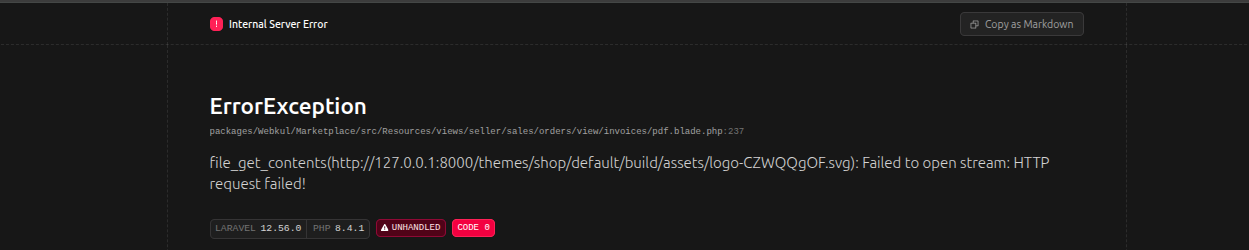
As a result, PDF generation could fail, hang, or cause a deadlock situation, showing a blocking operation. Below is the image attached.

Debugged Solution for Laravel PDF Asset Loading
Instead of loading the logo through an HTTP URL, we switched to using the actual filesystem path.
|
1 2 3 4 5 6 7 8 9 10 11 |
<img src="data:image/png;base64,{{ file_exists(public_path(parse_url(bagisto_asset('images/logo.svg'), PHP_URL_PATH))) ? base64_encode( file_get_contents( public_path( parse_url(bagisto_asset('images/logo.svg'), PHP_URL_PATH) ) ) ) : '' }}" /> |
The article provides enhanced insights into the above key findings.
Optimizing Laravel PDF Asset Loading with Filesystem Access

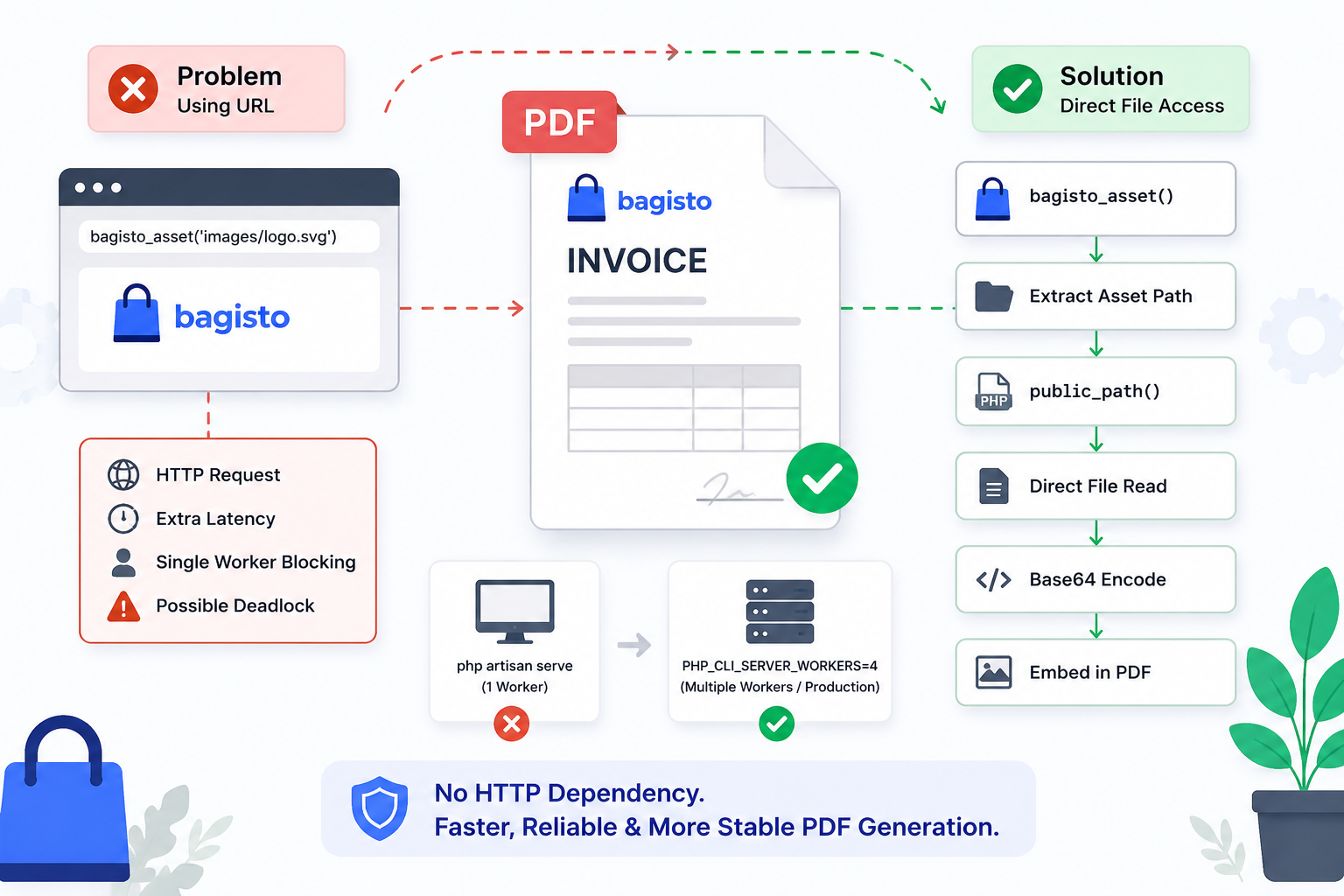
Flow of Asset Loading In Bagisto
The optimized approach now completely removes network dependency from the rendering process. Laravel PDF Asset Loading flow is encountered in specified way.
Findings and Conclusion
When embedding images into PDFs in Bagisto, Laravel, or any PHP application, avoid fetching local assets through HTTP URLs whenever possible.
Instead of:
|
1 |
file_get_contents(asset('image.png')) |
Prefer:
|
1 |
file_get_contents(public_path('image.png')) |
Direct filesystem access is more reliable and eliminates concurrency-related issues that can surface in development servers, queue workers, and PDF generation.
This small change significantly improved the stability of invoice and transaction PDF generation in our Marketplace module.
Using file_get_contents() with a URL generated by bagisto_asset() introduced an unnecessary HTTP dependency during PDF generation.
- By switching to direct filesystem access using
public_path(). - We eliminated internal HTTP requests, improved performance, and ensured consistent logo rendering across all environments.
- This approach is more efficient, more reliable, and better suited for PDF generation workflows where external requests can introduce latency or resource contention.
Final Thoughts
This issue highlighted best practice for PDF generation in Bagisto and Laravel applications: avoid relying on HTTP requests for locally available resources.
Adopting such small optimizations can significantly improve application stability and help prevent hard-to-diagnose issues in resource-intensive workflows.
You can also hire Laravel developers to build your custom solutions on Laravel.
To explore the available extensions for Bagisto, you can check out the Bagisto extension marketplace.