If your Laravel app starts slowing down as data grows, N+1 queries in Laravel are usually the first place to look.
It’s one of those bugs that’s completely invisible until it isn’t — and by then, your app is making 200 database calls for a single page load.
Let me show you what it is, how to catch it, and how to fix it.
What is the N+1 problem in Laravel?
Say you have a list of orders and you want to show the customer name for each one.
|
1 2 3 4 5 |
$orders = Order::all(); foreach ($orders as $order) { echo $order->customer->name; } |
Looks fine, right? Here’s what actually happens:
- Laravel runs 1 query to fetch all orders
- Then for each order, it runs another query to fetch the customer
So if you have 100 orders, that’s 101 queries. 500 orders? 501 queries.
This is the N+1 problem — 1 query to get the list, then N more queries for the related data.
Your database gets hammered, your page slows down, and nothing in the code looks obviously wrong.


How to spot N+1 queries in Laravel
Option 1: Laravel Debugbar
Install the debugbar package:
|
1 |
composer require barryvdh/laravel-debugbar --dev |
Visit any page and you’ll see a toolbar at the bottom showing how many queries fired and how long each took.
If you see 50+ nearly identical queries, you’ve found your N+1.
Option 2: Laravel Telescope
Go to the Queries tab after a request. You’ll see duplicate queries stacking up — same table, slightly different IDs.
Check the official Laravel Telescope documentation for full setup instructions.
|
1 2 3 |
composer require laravel/telescope --dev php artisan telescope:install && php artisan migrate |
Option 3: DB::listen() for a quick check
No packages? Drop this in your AppServiceProvider::boot() temporarily:
|
1 2 3 |
\DB::listen(function ($query) { \Log::info($query->sql, $query->bindings); }); |
Check your log file and count how many times the same query appears.
How to fix N+1 queries in Laravel with eager loading
The fix is almost always eager loading.
It tells Laravel to fetch the related data upfront in one query instead of one per record.
Change this:
|
1 |
$orders = Order::all(); |
To this:
|
1 |
$orders = Order::with('customer')->get(); |
Now Laravel runs just 2 queries total — fetch all orders, then fetch all related customers in one go.
One word — with() — and you go from 501 queries to 2.
Loading multiple relationships
You can eager load as many relationships as you need:
|
1 |
$orders = Order::with(['customer', 'items', 'items.product'])->get(); |
The dot notation handles nested relationships.
items.product means: load each order’s items, and for each item, load its product. Still just a handful of queries total.
Conditional eager loading with load()
Sometimes you don’t know upfront what you’ll need. Use load() after the fact.
For more on the difference between the two approaches, see our guide on lazy vs. eager loading in Laravel.
|
1 2 3 4 |
$orders = Order::all(); // later in the code... $orders->load('customer'); |
Same result — just more flexible when working with collections that come from elsewhere.
loadMissing() for partial collections
If some records might already have the relationship loaded and others don’t:
|
1 |
$orders->loadMissing('customer'); |
This only fires a query for records that don’t already have the relationship loaded. Useful inside loops or conditional logic.
When eager loading isn’t enough
Select only the columns you need:
|
1 |
Order::with('customer:id,name,email')->get(); |
This loads only id, name, and email from the customers table — not the full row.
Always include the foreign key (id here) or the relationship won’t link correctly.
Cache data that rarely changes:
|
1 |
$categories = Cache::remember('categories', 3600, fn() => Category::all()); |
If the same data hits the database on every request and barely changes, cache it.
For a deeper dive into database and caching performance, check out our guide on scaling Bagisto for large product catalogs.
It covers eager loading and caching strategies at scale.
Prevent N+1 queries in Laravel automatically
Laravel has a built-in way to throw an error whenever a lazy-loaded relationship fires unexpectedly.
Add this to AppServiceProvider::boot():
|
1 |
Model::preventLazyLoading(! app()->isProduction()); |
During development, any N+1 query throws an exception instead of silently running.
You’ll catch these before they ever reach production.
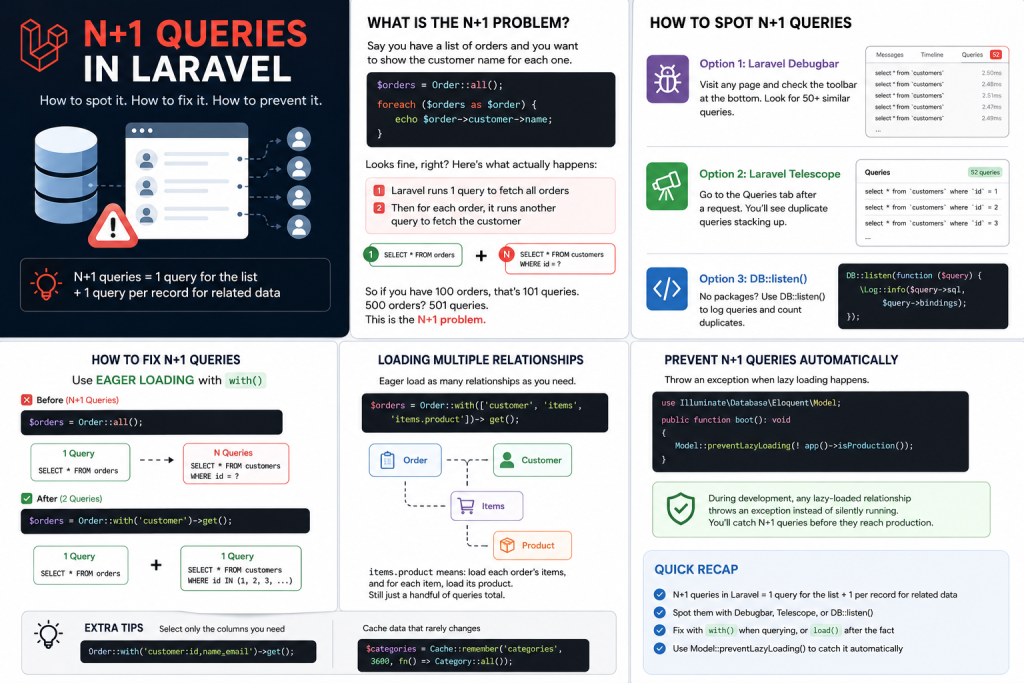

Quick recap
- N+1 queries in Laravel = 1 query for the list + 1 per record for related data
- Spot them with Debugbar, Telescope, or
DB::listen() - Fix with
with()when querying, orload()after the fact - Use
Model::preventLazyLoading()to catch it automatically in development
The fix takes 30 seconds once you know where to look. The tricky part is just noticing it exists — and now you know how.