
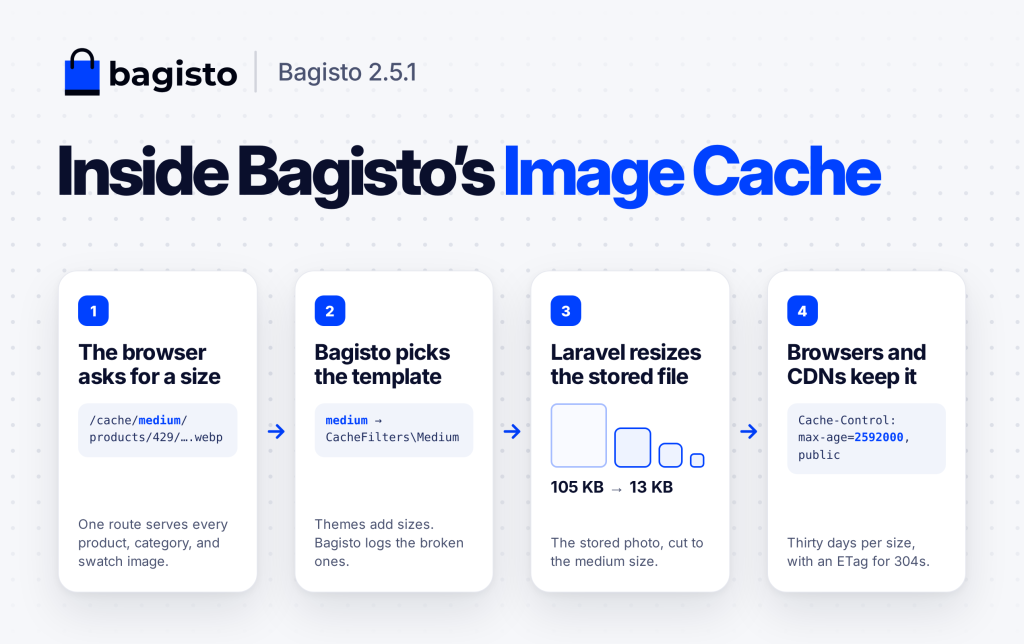
Images make up a large share of every storefront page. The Bagisto image cache resizes each one for the theme that shows it.
The median desktop homepage loads 1,054 KB of images. In Bagisto, the image cache decides how large each one is.
Bagisto serves every product, category, and swatch image through one route that resizes the stored file on request.


This post answers the questions developers ask about the image cache, from the URL a browser requests to the log entries it writes.
What Happens When a Browser Requests a Product Image?
Every resized image has a URL in the form cache/{template}/{path}. The template names a size, and the path names the stored file.
Bagisto reads the file from your storage disk, runs it through the template, and returns the result.
Laravel’s image component does the resizing. The IMAGE_DRIVER setting chooses GD, the default, or Imagick.
This request asks for the medium size of a smart watch photo on a Bagisto v2.5.1 store:
|
1 2 3 4 5 6 7 |
$ curl -I https://your-store.com/cache/medium/\ products/429/YgXZW9VsRs2t1JoB3iSsGzDcWSWRPnUdoAs9rI30.webp HTTP/1.1 200 OK Content-Type: image/webp Content-Length: 13024 Cache-Control: max-age=2592000, public Etag: 2e3e620f3fc25e2426cdc78d018ac1ad |
The stored photo weighs 104,804 bytes. The medium size weighs 13,024 bytes, and the small size only 1,810.
Bagisto does not write the resized file to disk. It sends a public Cache-Control header, so browsers and any CDN keep the copy.
The lifetime setting in config/imagecache.php sets that header. Its default of 43,200 minutes keeps each image for 30 days.
A repeat request that sends the same ETag gets a 304 Not Modified answer and no image bytes.
Where Do the Small, Medium, and Large Sizes Come From?
The templates setting in config/imagecache.php maps each size name to a class with an applyFilter() method:
|
1 2 3 4 5 |
'templates' => [ 'small' => Webkul\Shop\CacheFilters\Small::class, 'medium' => Webkul\Shop\CacheFilters\Medium::class, 'large' => Webkul\Shop\CacheFilters\Large::class, ], |
The storefront classes in Webkul\Shop\CacheFilters crop each kind of image to its own shape, in pixels:
| Template | Product images | Category images | Swatch images | Any other image |
|---|---|---|---|---|
| small | 100 × 100 | 80 × 80 | 60 × 60 | 768 × 280 |
| medium | 350 × 360 | 110 × 110 | 210 × 210 | 1024 × 372 |
| large | 560 × 610 | 165 × 165 | 330 × 330 | 1280 × 467 |
Every image also carries an original URL, which serves the stored file at full size.
Before Bagisto v2.5, product image sizes were admin settings. The Bagisto v2.5 release moved them into these classes.
How Does a Theme Add Its Own Image Size?
Since Bagisto v2.5, a theme registers its own sizes in config/themes.php, under customize.image_cache:
|
1 2 3 4 5 6 7 8 9 10 11 |
use Webkul\Fashion\ImageTemplates\ProductCard; 'customize' => [ 'image_cache' => [ 'templates' => [ 'product_card' => ProductCard::class, ], 'product_images' => ['product_card'], ], ], |
The templates key maps a name to a class. Reusing small, medium, or large overrides that size for the theme alone.
The product_images key lists the extra sizes product images carry. Each one appears as product_card_image_url in the product image data.
Only channels that run the theme serve cache/product_card/{path}. A channel on another theme answers that URL with a 404.
The category_images and swatch_images keys work the same way for category images and swatches. Admin pages always use the core sizes.
The theme development guide covers the rest of a theme package.
Can an Image Cache Template Use Other Services?
Since Bagisto v2.5.1, Laravel’s service container builds every template class.
A template can type-hint its dependencies, or take values with defaults the store can override:
|
1 2 3 4 5 6 7 8 9 10 11 12 13 14 15 |
namespace Webkul\Fashion\ImageTemplates; use Illuminate\Image\Image; class ProductCard { public function __construct( protected int $width = 480, protected int $height = 600, ) {} public function applyFilter(Image $image): Image { return $image->cover($this->width, $this->height); } } |
A service provider can then change one value without touching the class:
|
1 2 3 |
$this->app->when(ProductCard::class) ->needs('$width') ->give(560); |
Binding a template class to a subclass replaces it everywhere, with no change to the configuration.
List each template by its class name. The image cache does not apply an object or a closure, and php artisan config:cache cannot store one.
When the container cannot fill a constructor parameter, Bagisto reports it, and the images of that template answer 404.
What Happens When an Image Template Is Broken?
Before v2.5.1, a missing class or a class without applyFilter() failed in silence. Its URL served the full-size original instead.
The Bagisto v2.5.1 release changed that. Bagisto now reports each broken entry and skips it:
| Entry in config/imagecache.php | Before v2.5.1 | Since v2.5.1 |
|---|---|---|
| small names a class that no longer exists | Full-size original, nothing logged | Reported, and a 100 × 100 crop |
| small holds a closure | Full-size original, nothing logged | Reported, and a 100 × 100 crop |
| thumb names a class that no longer exists | Full-size original, nothing logged | Reported, and a 404 |
| No medium entry | A 404 | A 300 × 300 crop |
The fallback crops come from Webkul\ImageCache\Templates. They are plain squares, not the storefront’s shapes, so fix the entry the log names.
The log entry, wrapped here to fit, names the template, the file it came from, and what the image cache expected:
|
1 2 3 4 5 |
Image template [thumb] of config/imagecache.php is invalid: a name of letters, digits, dashes or underscores other than original, download, logo, mapped to a class with a public applyFilter() method, is required; [App\ImageTemplates\Thumb] given. |
Bagisto writes each entry at most once an hour, so a busy catalog page does not flood the log.
A template name may use letters, digits, dashes, and underscores. The names original, download, and logo stay reserved.
What Happens When the Image Cache Cannot Read Remote Storage?
The image cache reads from your default storage disk first, then from the local paths in config/imagecache.php.
Before v2.5.1, a remote disk with wrong credentials answered every image with a 404 and logged nothing.
Since v2.5.1, the image cache asks the disk whether a failed file exists. A file that is simply missing stays a quiet 404.
Bagisto reports a file the disk holds but cannot read, or a disk that cannot answer, as UnreadableImage.
Each report names the disk and the path. Bagisto writes it at most once an hour for each disk and operation.
Bagisto also reports a stored image that fails to resize, as UnprocessableImage.
On Amazon S3, grant the IAM user s3:ListBucket. Without it, S3 answers a missing file with a 403, and Bagisto reports each miss.
The S3 Storage in Bagisto post walks through setting up the disk itself.
Can You Move or Disable the Image Cache Route?
The route setting in config/imagecache.php names the path, cache by default. Since v2.5.1, every image URL follows it.
Set route to null, or leave it empty, to disable the image cache.
Product, category, and section images then link their stored files at full size. Admin pages leave out the Bagisto logo.
How Does the Appearance Preview Show the Right Theme’s Images?
The Appearance editor previews a storefront theme on the admin host. That host’s channel may run a different theme.
Since v2.5.1, every resized image URL in the preview names the previewed theme after an @ sign.
In this preview of the Default theme, a category image loads from cache/large@default/categories/2/….

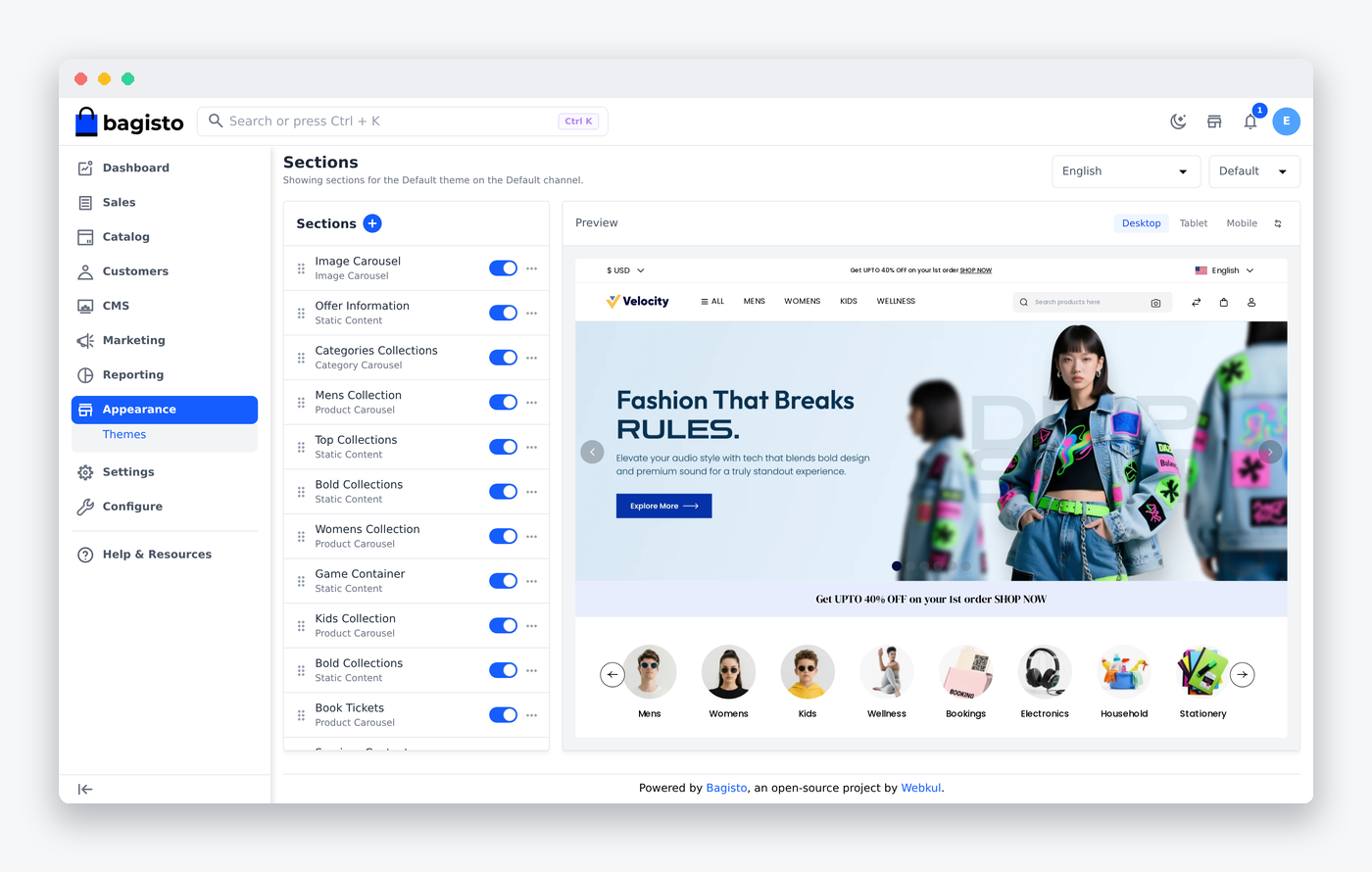
The image cache then cuts each image as the named theme does, including sizes only that theme registers.
Storefront URLs do not change. Only the preview adds the theme name, and original URLs never carry it.
How Should Your Own Code Build Image URLs?
Call image_url() instead of building a cache/ URL manually. It follows the route setting and the previewed theme:
|
1 2 |
$url = image_url($path, 'product_card') ?? Storage::url($path); |
The image_url() helper returns null while the route is disabled. The fallback keeps the stored file on the page.
The image_urls() helper returns every size at once, keyed as small_image_url, medium_image_url, and so on.
Get Started with the Image Cache
- Upgrade to Bagisto v2.5.1, then check the log for broken templates after the first storefront pages load.
- Replace hand-built cache/ URLs in your theme with image_url().
- Register your theme’s sizes under customize.image_cache instead of editing core files.
- Put a CDN in front of the store, since every resized image carries a 30-day public cache header.
The upgrade guide lists every change to the TemplateRegistry class in v2.5.1.
With the image cache sizing images for each theme and reporting its own failures, your storefront serves smaller images and tells you when one breaks.