Laravel pagination makes it easy to manage large datasets by splitting records into smaller, organized pages instead of displaying everything at once.
Laravel provides built in methods like paginate(), simplePaginate(), and cursorPaginate() that you can use directly in your controller.
These methods let you control how many records are shown on each page and make navigation easy for users.
By using Laravel pagination, you can build faster, cleaner, and more user friendly web applications.
How Pagination Works in Laravel?
The pagination process has two main steps:
- Retrieve a limited number of records from the database
- Display records with pagination links in the view
This approach improves performance and reduces page load time.
In this section, we will learn how to implement pagination in Laravel step by step.
Step 1: Query the Database
Suppose you have a StudentController and want to display student records with pagination.
You can use Laravel’s paginate() method to show a limited number of records per page and add navigation links for easy browsing.
|
1 2 3 4 5 6 7 8 9 10 11 12 13 14 15 16 17 18 19 20 21 22 23 |
<?php namespace App\Http\Controllers; use Illuminate\Http\Request; use App\Models\Student; class StudentController extends Controller { public function getData() { $studentData = Student::paginate(10); return view('index', compact('studentData')); } } |
paginate(10) means 10 records per page.
Step 2: Display the Paginated Data
Create an index.blade.php file to show student records.
|
1 2 3 4 5 6 7 8 9 10 11 12 13 14 15 16 17 18 19 20 21 22 23 24 25 26 27 28 29 30 31 32 33 34 35 36 37 38 39 40 41 42 43 44 45 46 47 48 49 50 51 52 53 54 55 56 57 58 59 60 61 62 63 64 65 66 67 68 69 70 71 72 |
<!DOCTYPE html> <html> <head> <meta charset="utf-8"> <title>Laravel Pagination</title> <meta name="viewport" content="width=device-width, initial-scale=1"> <link rel="stylesheet" href="https://stackpath.bootstrapcdn.com/bootstrap/4.5.0/css/bootstrap.min.css"> </head> <body> <h3 class="text-center">Student Data</h3> <div class="container mt-5"> <table class="table table-bordered mb-5"> <thead> <tr class="thead-dark"> <th>#</th> <th>Student Name</th> <th>Email</th> <th>Address</th> </tr> </thead> <tbody> @foreach($studentData as $student) <tr> <td>{{ $student->id }}</td> <td>{{ $student->name }}</td> <td>{{ $student->email }}</td> <td>{{ $student->address }}</td> </tr> @endforeach </tbody> </table> <div class="d-flex justify-content-center"> {!! $studentData->links() !!} </div> </div> </body> </html> |
The links() method automatically creates pagination links based on the current page and total number of records.
By default, Laravel uses Tailwind CSS for pagination. If your project uses Bootstrap, you can switch Laravel to use Bootstrap pagination styles.
Enable Bootstrap Pagination
Add the following code to AppServiceProvider.php:
|
1 2 3 4 5 6 7 8 9 10 11 12 13 14 15 16 17 18 19 20 21 22 |
<?php namespace App\Providers; use Illuminate\Support\ServiceProvider; use Illuminate\Pagination\Paginator; class AppServiceProvider extends ServiceProvider { public function register(): void { // } public function boot(): void { Paginator::useBootstrap(); } |
Result: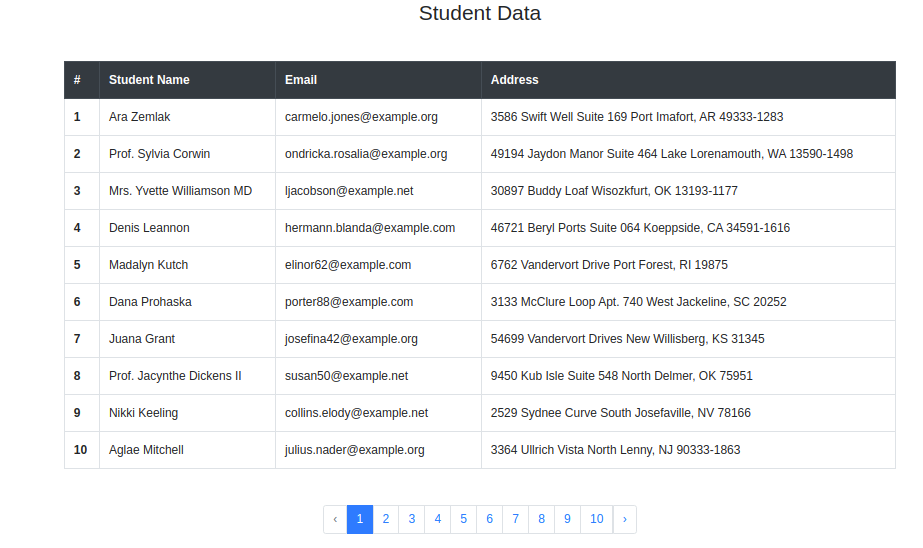

Using Simple Pagination
The paginate() method counts the total number of records before fetching data.
This helps Laravel show page numbers and the total number of pages.
If you only need Previous and Next buttons, use simplePaginate().
It avoids counting all records and can perform better with large datasets.
|
1 2 3 4 5 6 7 8 9 10 11 12 13 14 15 16 17 18 19 20 21 |
<?php namespace App\Http\Controllers; use Illuminate\Http\Request; use App\Models\Student; class StudentController extends Controller { public function getData() { $studentData = Student::simplePaginate(10); return view('index', compact('studentData')); } } |
Result: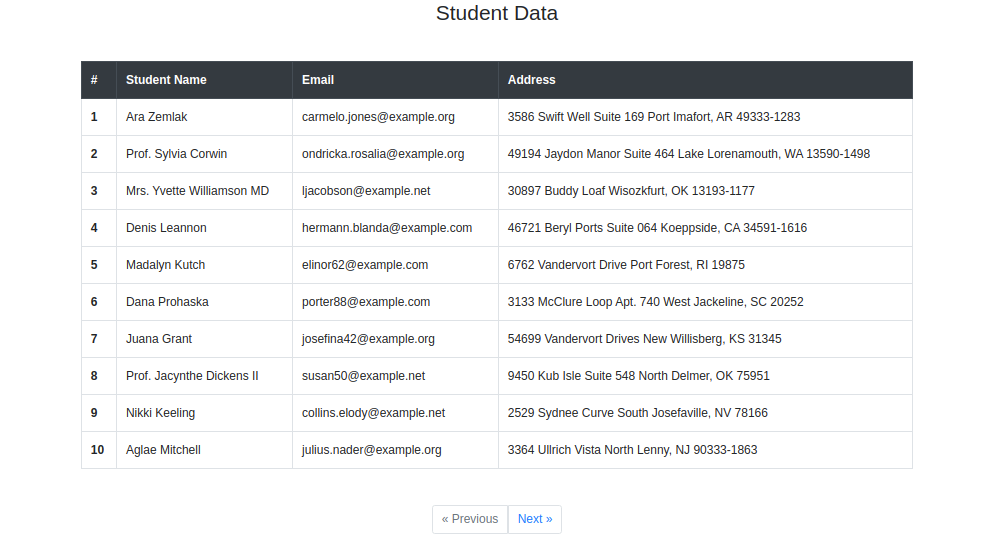

Types of Pagination in Laravel
Laravel provides three main pagination methods to handle large data easily.
1. Pagination
The paginate() method gets records and also counts the total number of results.
It is useful when you want full page navigation with page numbers.
Features:
- Total pages
- Page numbers
- First, Previous, Next, and Last links
2. Simple Pagination
The simplePaginate() method shows only Previous and Next links.
It is best when you do not need page numbers and want faster performance.
Best for:
- Large data
- Faster loading
- Simple navigation
3. Cursor Pagination
The cursorPaginate() method is the fastest pagination method in Laravel.
Instead of page numbers, it uses a cursor to find the next records.
Best for:
- Very large data
- Infinite scroll
- Real-time apps
$studentData = Student::cursorPaginate(10);
It returns:
The cursor keeps the current position in the data. It helps Laravel load the next set of records quickly.
This makes it faster and more efficient for handling large amounts of data.
Which Pagination Method Should You Use?
| Method | Best For |
| paginate() | When you need page numbers and total pages |
| simplePaginate() | When you only need Previous and Next links |
| cursorPaginate() | For large datasets and infinite scrolling applications |
Conclusion
Laravel provides different pagination methods for different needs.
You can use full page navigation, simple previous/next links, or fast pagination for large datasets.
Choose the method that best fits your application’s needs and performance goals.
You can also hire Laravel developers for custom solutions or explore our extensions to improve your application.

