Bagisto’s EU Withdrawal Feature empowers merchants to comply with European consumer protection laws seamlessly.
-
- It grants customers the legal right to withdraw from contracts online.
- The feature ensures full compliance with EU Directive 2023/2673.
- Both registered and guest customers can submit withdrawal requests easily.
- Merchants gain complete control over withdrawal management and approvals.
Introduction to the EU Withdrawal Right
What Is the EU Withdrawal Right?
The EU Withdrawal Right is a legal entitlement that allows consumers to cancel purchase contracts.
Specifically, customers have the right to withdraw from a contract within a set period, typically 14 days from purchase.
This applies to distance selling, including all online purchases made to EU customers.
Importantly, it provides consumers with a cooling-off period before becoming fully bound to the contract.
Why Was It Introduced?
The EU established withdrawal rights to protect consumers in digital commerce.
Therefore, it addresses the power imbalance between merchants and individual buyers.
Moreover, it reflects the changing nature of commerce and consumer expectations.
Additionally, it reduces consumer anxiety about online purchases and encourages eCommerce growth.
Which Customers Does It Apply To?
First, the withdrawal right applies to all EU consumers making distance purchases.
Additionally, it covers customers from all EU member states and EEA countries.
Furthermore, it applies to both registered customers and guest buyers.
Notably, it includes purchases via website, mobile app, phone, or email.
How It Protects Consumer Rights
The withdrawal right gives consumers peace of mind when shopping online.
Specifically, customers can return products within the legal period without penalty.
Moreover, it creates a level playing field where merchants respect consumer interests.
Consequently, it reduces buyer hesitation and encourages online shopping participation.
Importance of Compliance for eCommerce Businesses
Compliance is not optional—it’s a legal requirement for merchants.
Therefore, non-compliance can result in significant fines and legal penalties.
Moreover, lacking withdrawal support damages merchant reputation and customer trust.
Additionally, proper implementation demonstrates professionalism and commitment to customer rights.
Ultimately, compliant businesses gain competitive advantage and customer loyalty.
Key Features of Bagisto’s EU Withdrawal
Feature Highlights
- Enable/Disable Option: Merchants can toggle the EU Withdrawal feature from the admin panel.
- Dual Customer Support: Both registered customers and guests can submit requests.
- Automated Notifications: Customers receive instant email confirmations for all requests.
- Request Tracking: Complete withdrawal request history and status visibility.
- Admin Workflow: Streamlined approval and management of withdrawal requests.
- Regulatory Compliance: Fully compliant with EU Directive 2023/2673, Article 11a CRD.
- Guest Verification: Secure verification process for guest customer withdrawals.
Configuration Guide (Admin Side)
Enable the EU Withdrawal Feature
Navigate to the Admin Panel and access the Settings section.
Subsequently, locate the “EU Withdrawal Configuration” option under Configuration-> sales.
Toggle the feature to “Enabled” to activate the withdrawal functionality across your store.
Note: You can enable or disable this feature per-channel if you have multiple storefronts.
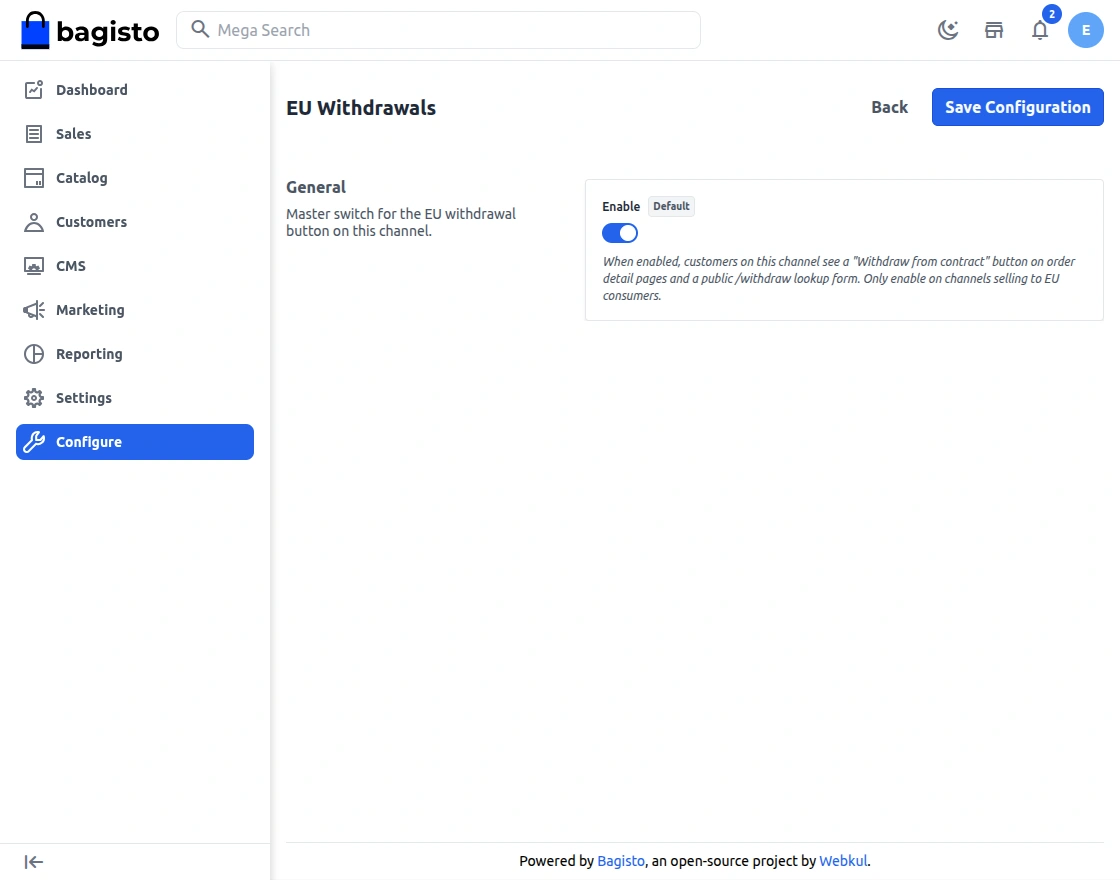

Verification Checklist: Ensure the withdrawal button appears on customer order pages after enabling.
How Registered Customers Submit Withdrawal Requests
Complete Step-by-Step Process
Step 1: Customer Places an Order
First, the customer browses store and adds items to their cart.
Subsequently, they proceed to checkout and complete their purchase.
Next, an order confirmation email is sent to the customer immediately.
The customer can now access their order from their account dashboard.
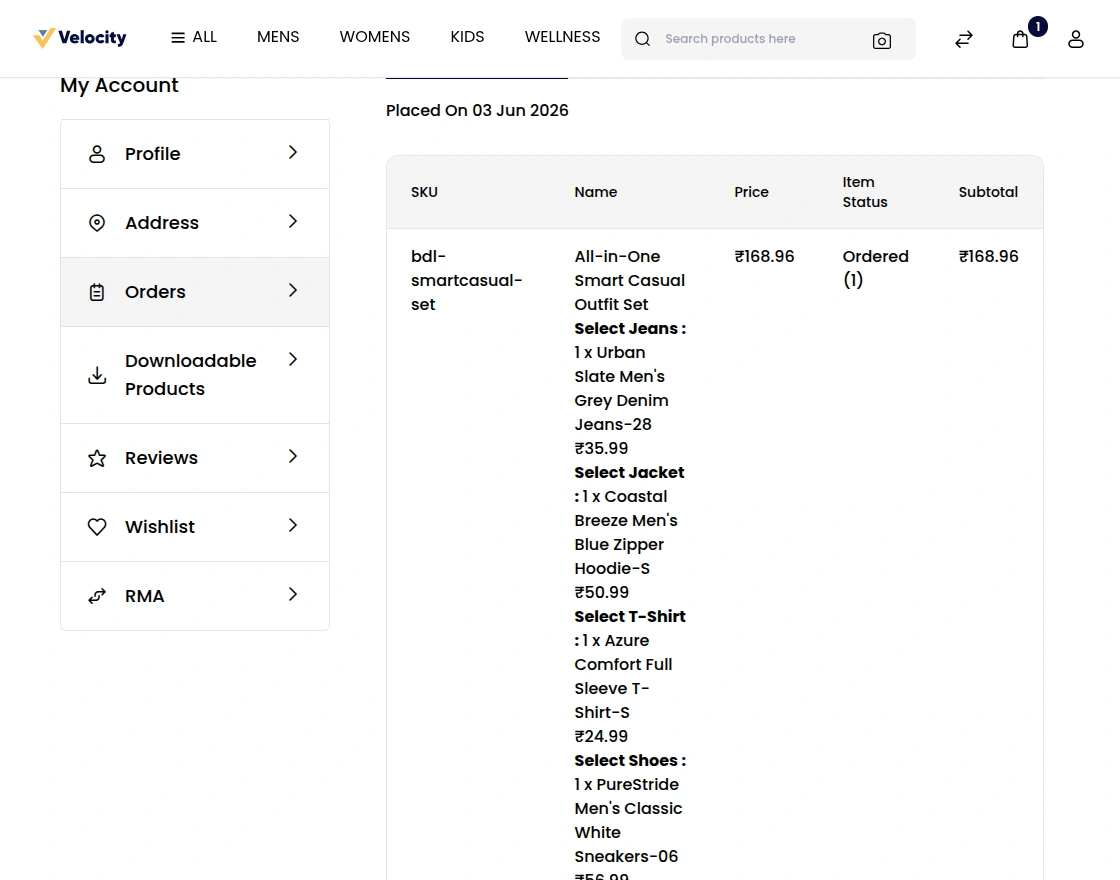
Step 2: Access the Withdrawal Request Option
The customer logs into their account and navigates to “My Orders.”
Subsequently, they locate the order they wish to withdraw from.
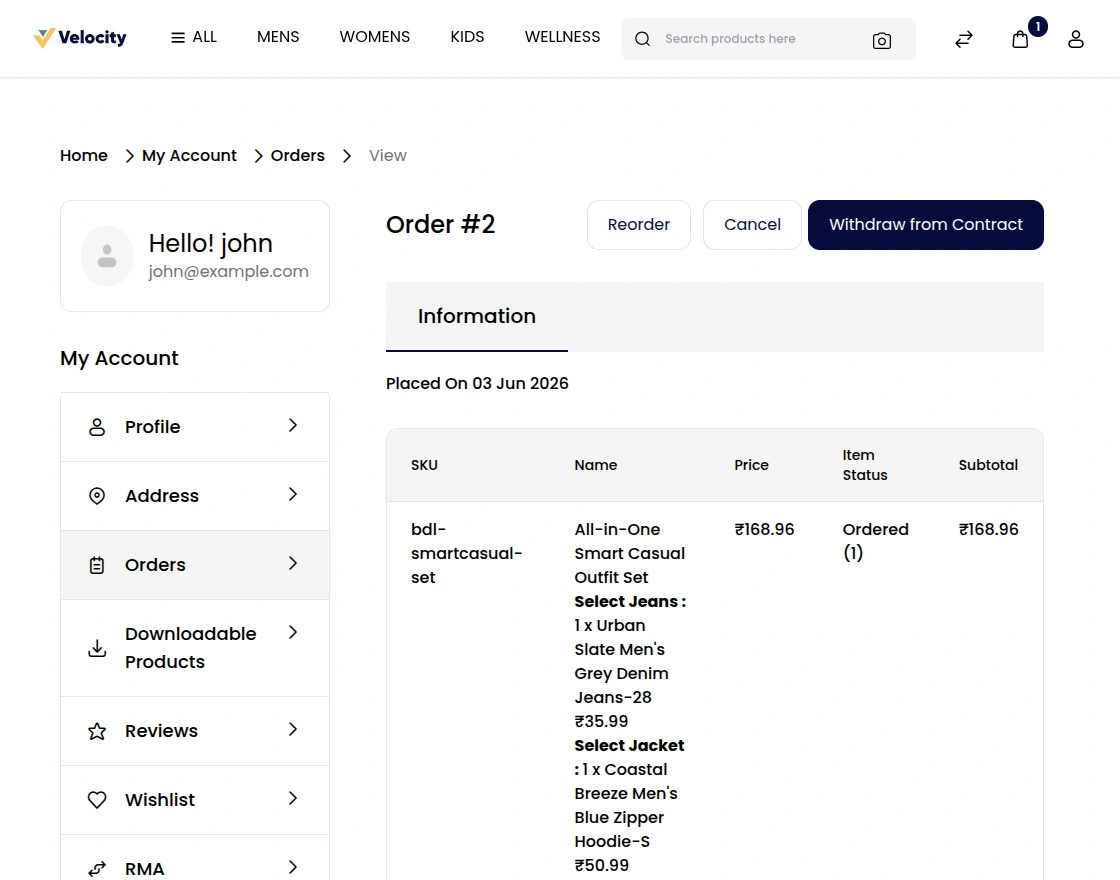
Moreover, a prominent “Withdraw from Contract” button appears on the order details page.
The button is clearly visible and easy to click, ensuring customer awareness.
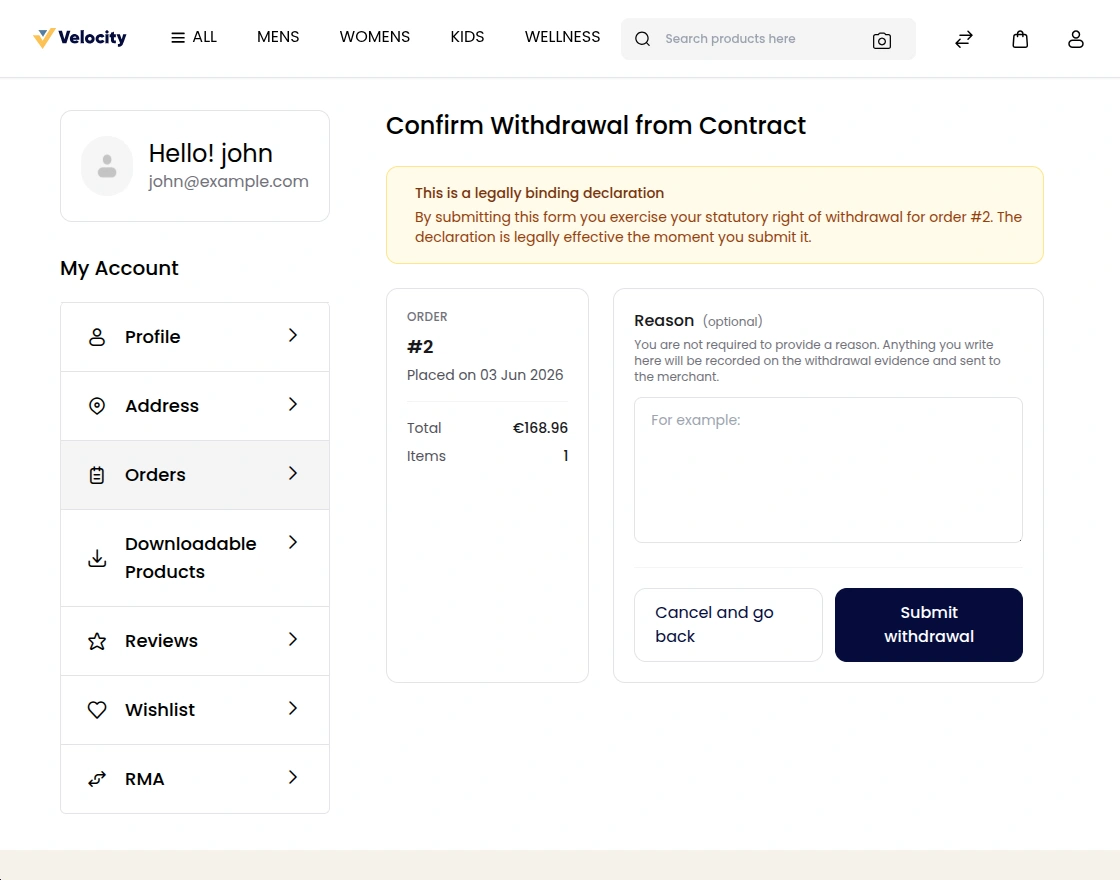
Step 3: Submit the Withdrawal Request
When the customer clicks the withdrawal button, a form appears.
Subsequently, the form displays the order details for confirmation.
The customer selects the withdrawal reason from predefined categories.
Moreover, they can add optional comments explaining their withdrawal decision.
Finally, they click “Submit Withdrawal Request” to finalize their request.
Step 4: Confirmation Email Received
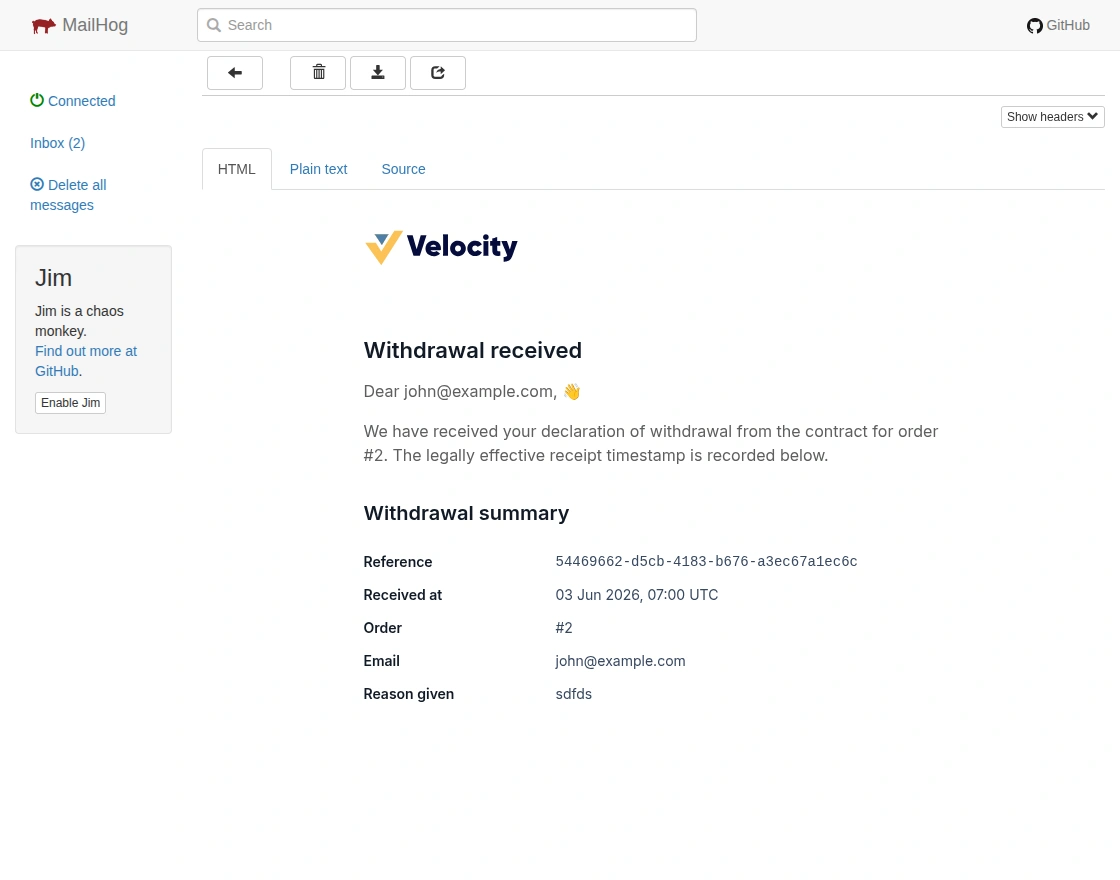
Upon submission, the system generates a confirmation email automatically.
Therefore, the customer receives an immediate notification of their request.
Moreover, the email includes all withdrawal details and reference number.
Additionally, it explains the next steps and expected processing timeline.
The email serves as legal proof of the withdrawal request submission.
How Guest Customers Submit Withdrawal Requests
Complete Step-by-Step Process for Guests
Step 1: Guest Visits the Withdrawal Request Page
The guest customer doesn’t have an account but wants to withdraw from a purchase.
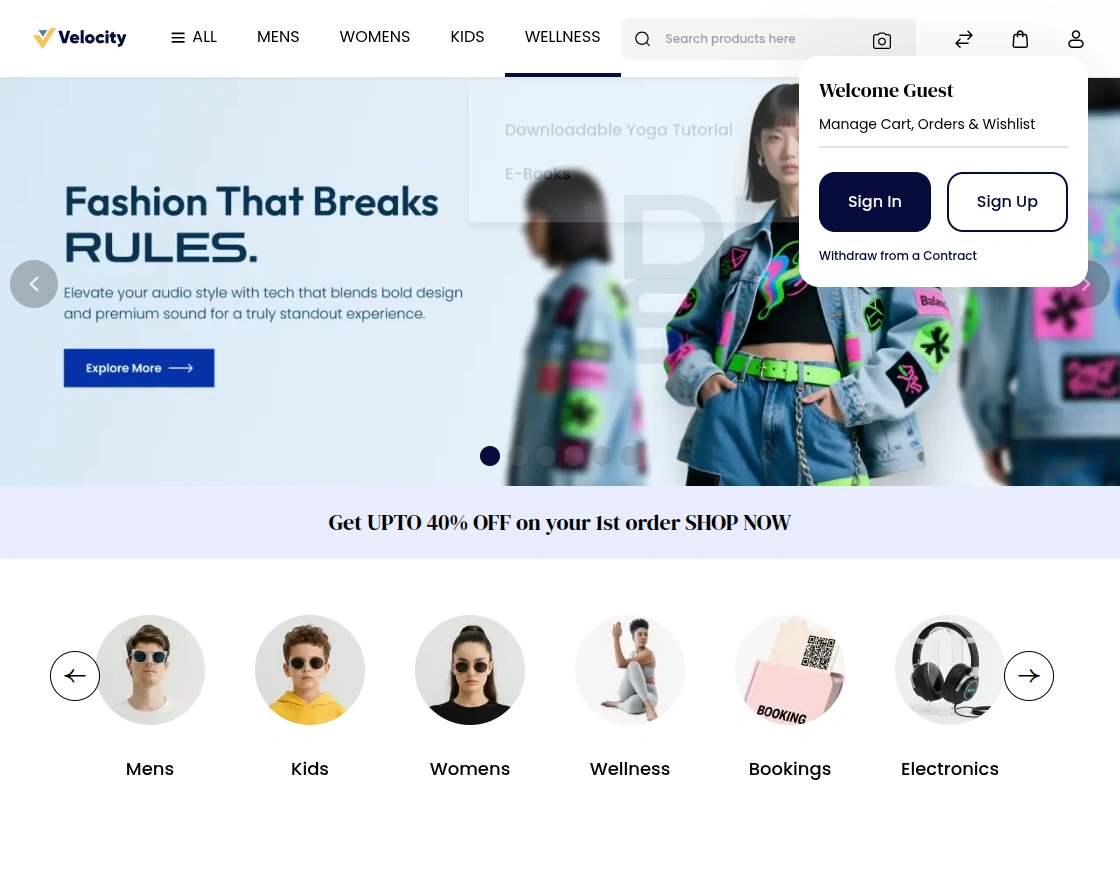
Subsequently, they access the public “Guest Withdrawal Request” page.
This page is accessible from your store’s profile button without login required.
The page explains the withdrawal process and what information guests need.
Step 2: Guest Enters Required Information
First, the guest enters their email address associated with the purchase.
Subsequently, they enter the order number from their purchase confirmation email.
After submission, an email with a withdrawal request link will be delivered to the provided email address.
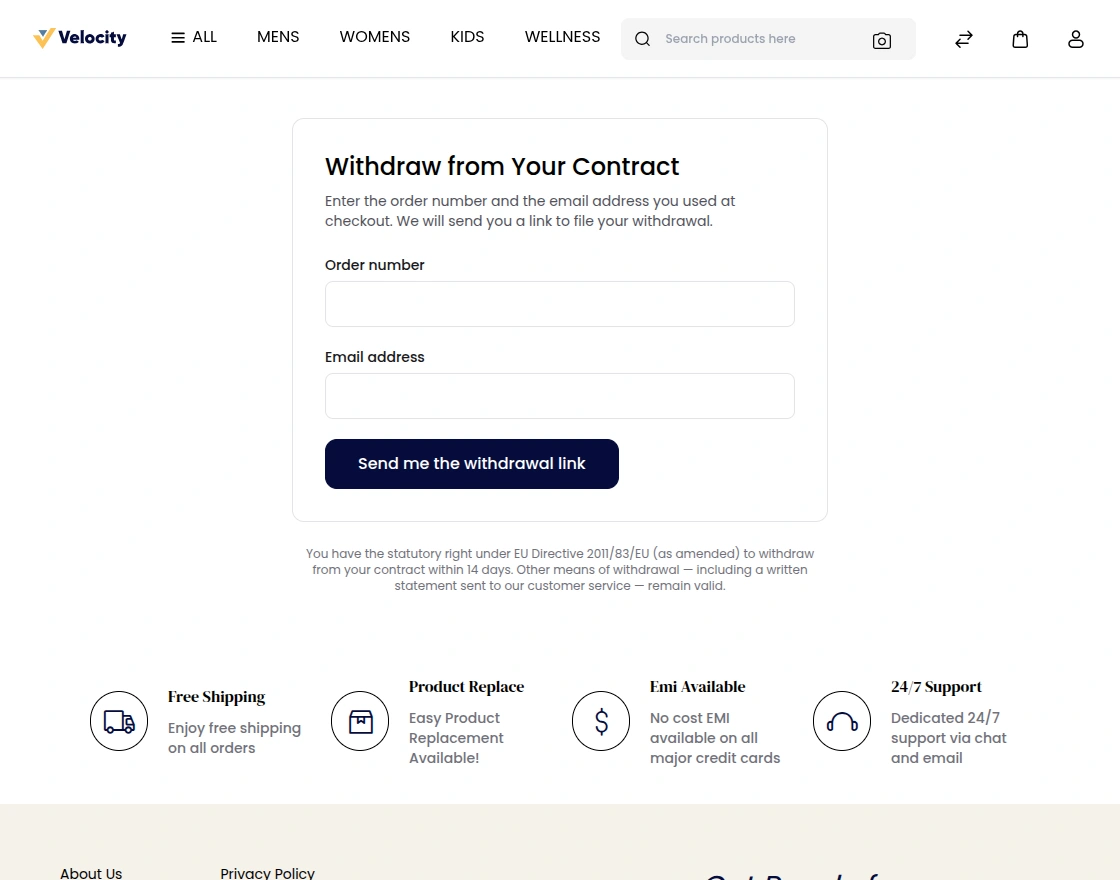
Verification Purpose: This information confirms the guest owns the order they’re withdrawing from.
Step 3: Verification Email Is Sent
The email contains a unique verification link for security.
Moreover, the email explains the next step.
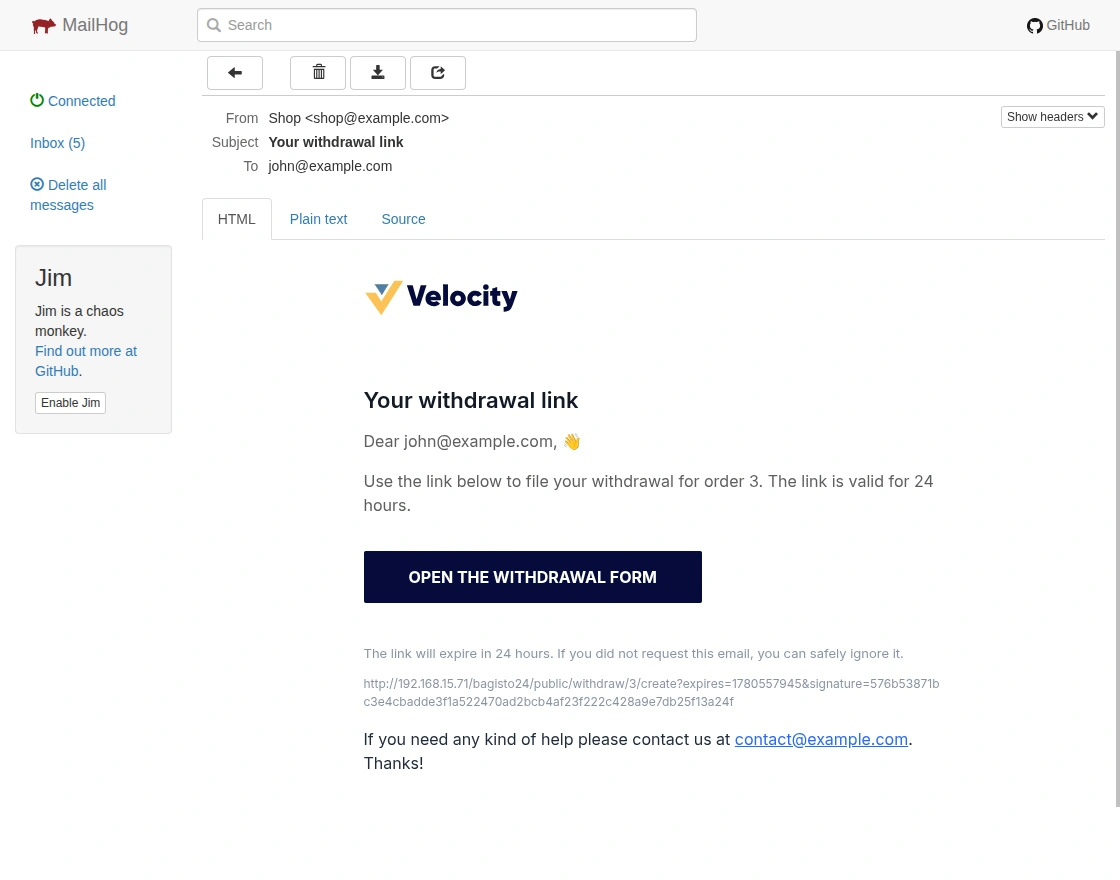
Security Feature: The verification link expires after 24 hours for security purposes.
Step 4: Guest Clicks the Verification Link
The guest receives the verification email and clicks the provided link.
The guest customer will provide the required information to initiate the withdrawal request.
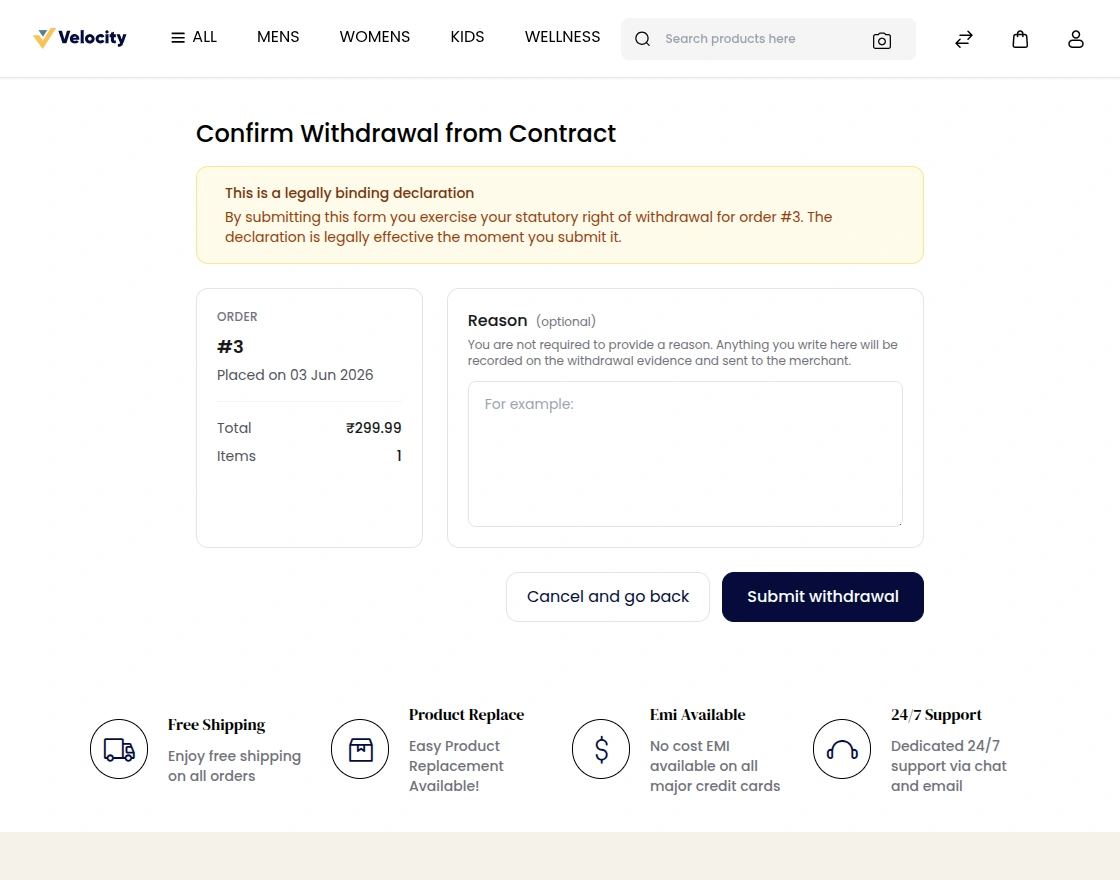
Step 5: Successful Withdrawal Request Submission
After verification, the system processes the withdrawal request immediately.
Therefore, the guest receives a confirmation message on their screen.
Moreover, they get a final confirmation email with request details.
The withdrawal request is now in the merchant’s queue for review.
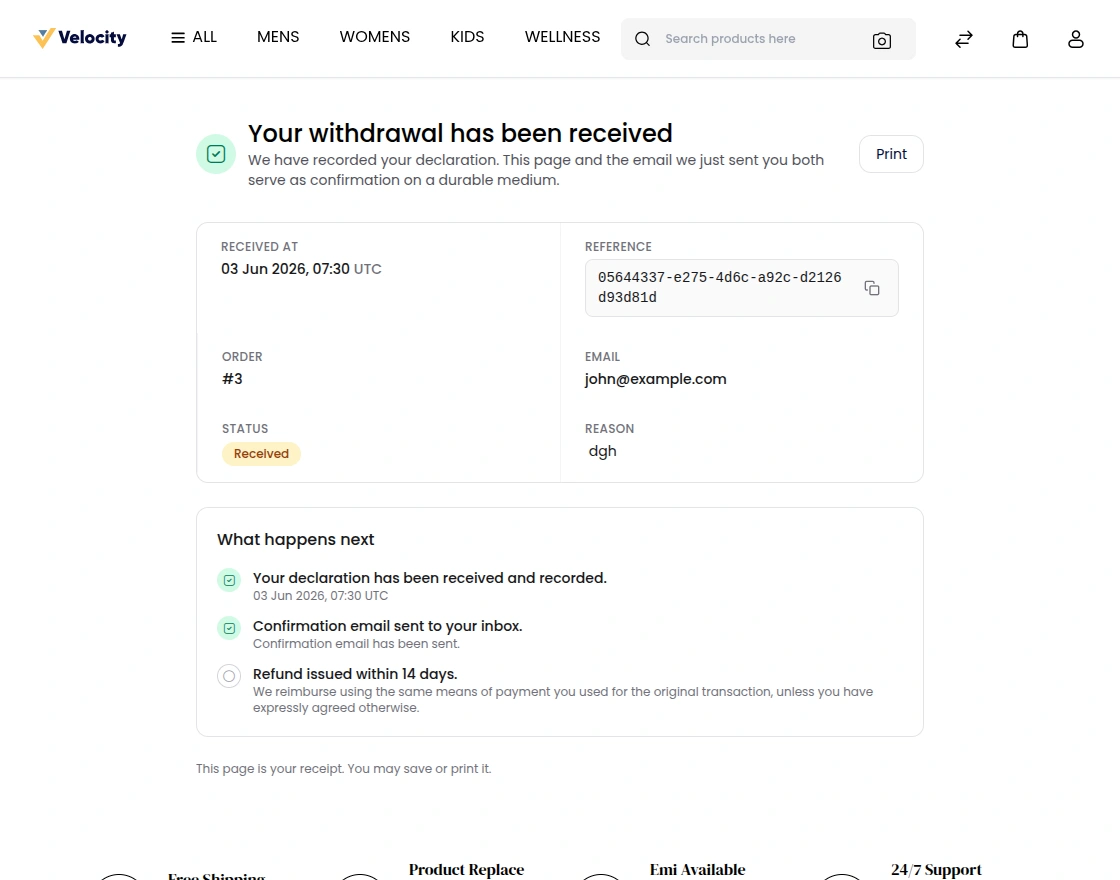
Next Steps: The merchant will review and process the request within the configured timeframe.
Admin Management of Withdrawal Requests
Viewing Withdrawal Requests
Navigate to the Admin Panel and access “Withdrawal Requests” from the sales -> EU Withdrawal menu.
Subsequently, you’ll see a datagrid with all pending, approved, and rejected requests.
The datagrid displays customer email, order id, request date, current status and other.
Moreover, filters allow quick sorting by status, date range, or customer.
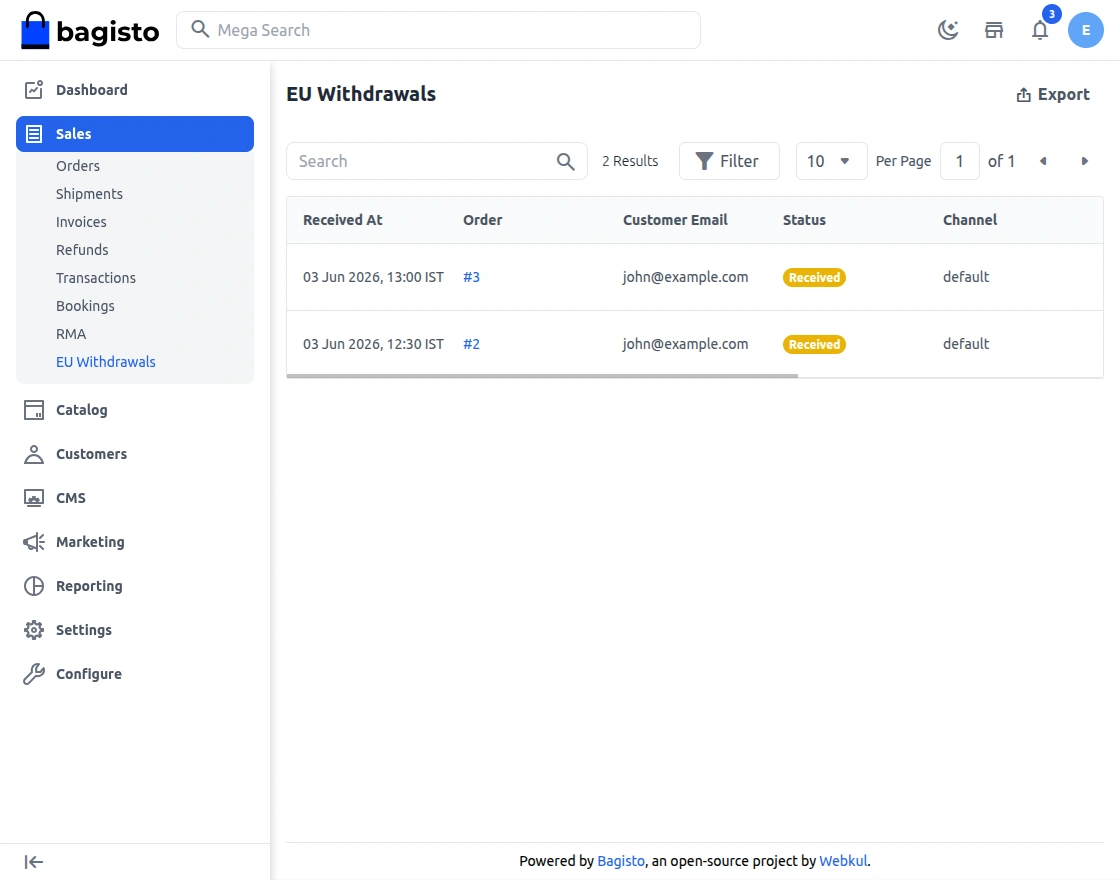
Datagrid Features: Bulk actions enable processing multiple requests simultaneously.
Reviewing Request Details
Click on any withdrawal request to view complete details.
Subsequently, you’ll see order information, customer details, and withdrawal reason.
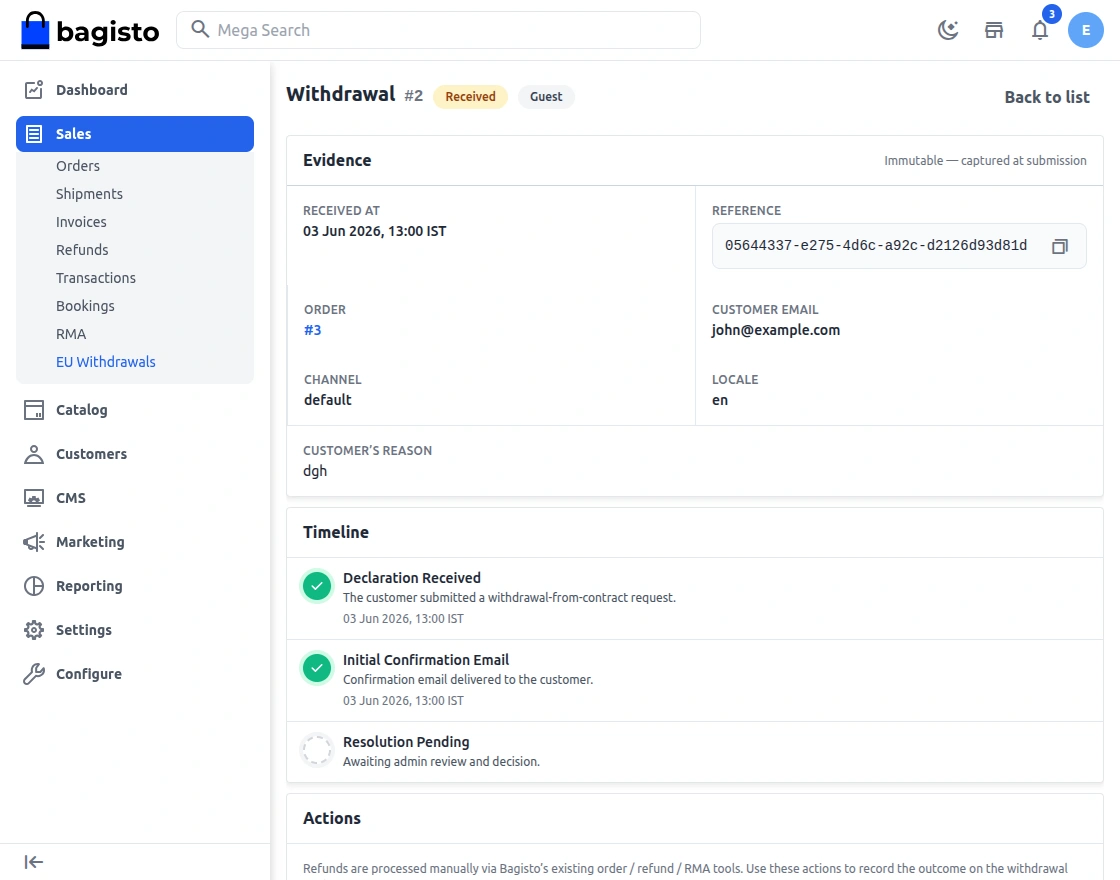
Detail View Benefits: Complete information helps in making informed approval decisions.
Approving or Rejecting Requests
In the request details view, you have clear approval and rejection buttons.
For approvals, click select the Mark as Refunded (Refunds are processed manually via Bagisto’s existing order / refund / RMA tools).
For rejections, provide a reason and explanation of your decision and click of Decline Withdrawal.
The system automatically notifies the customer of your decision via email.
Conclusion
The EU Withdrawal feature represents a significant step toward merchant compliance.
Moreover, it demonstrates respect for consumer rights and transparency in commerce.
Specifically, Bagisto’s implementation makes compliance straightforward and customer-friendly.
Additionally, merchants benefit from automated workflows and reduced administrative burden.
Ultimately, customers gain confidence knowing they can withdraw from contracts safely.
Ready to Implement? Update Bagisto to v2.4.5 and enable the EU Withdrawal feature today.
Follow the configuration guide, test the process, and ensure your store meets EU requirements.
Finally, thanks for reading this comprehensive guide. If you have questions about EU Withdrawal implementation, please feel free to comment below.
Also you can hire laravel developers to customize this feature for your business needs. Kindly explore our extensions.

