Bagisto latest version 2.4.10 brings a new Appearance area for themes, a live section editor, two new integrations.
- First, it gives themes their own Appearance area and a live section editor with a storefront preview.
- It also adds the PayGlocal payment gateway and Brevo as a mail driver.
- In addition, it makes the product datagrid and a full reindex considerably faster.
- Finally, it fixes payment currency handling, reporting, imports, search, and a long list of product image issues.

Overall, these changes in Bagisto v2.4.10 make the admin quicker to work in and the storefront easier to shape.
New Features in Bagisto Version 2.4.10
Themes Now Have Their Own Appearance Area
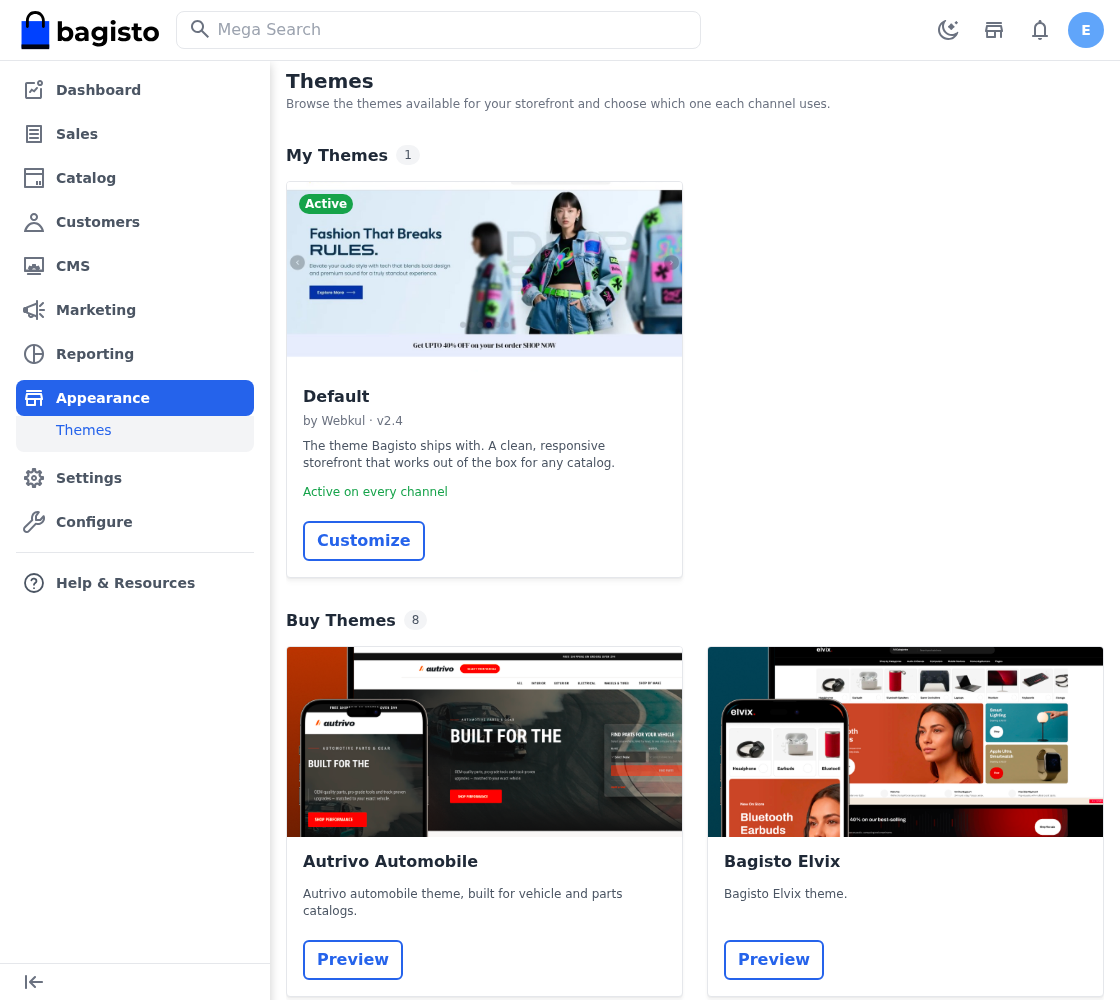
- Themes have moved out of Settings into a new Appearance area of their own.
- The screen lists the themes your store already has alongside the ones you can buy, so you see at a glance which is which.
- From there you activate a theme across the channels you choose.
- Bagisto now calls theme customisations sections throughout, and each section belongs to its own theme.
- Consequently, a store running more than one theme keeps their content properly apart.

A Live Section Editor With Storefront Preview
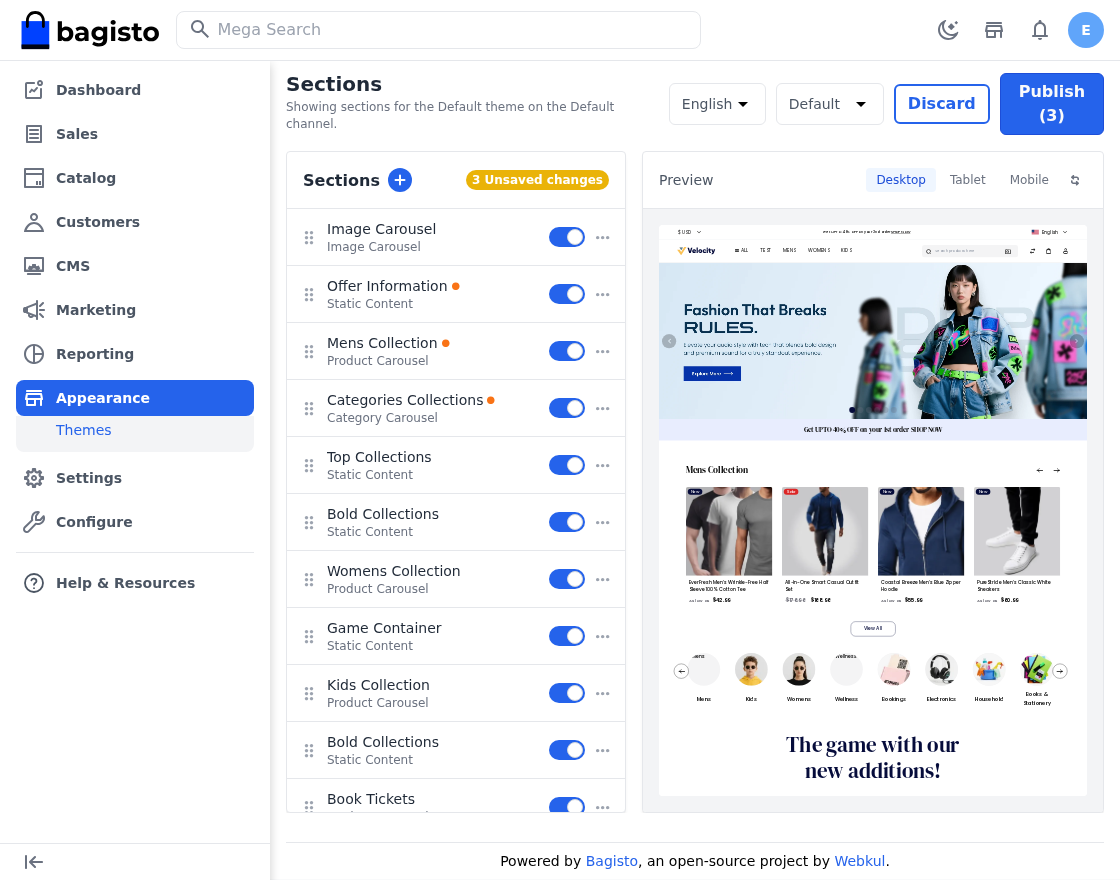
- You now edit sections beside a live preview of the storefront, so you see the result as you work.
- Bagisto holds your edits as drafts, one per language, until you publish them.
- You reorder sections by dragging them, rather than typing position numbers.
- A single panel, built from the section you opened, replaces the six separate pages this used to need.
- Therefore, you preview and edit each channel on its own, with its own content.

PayGlocal Payment Gateway
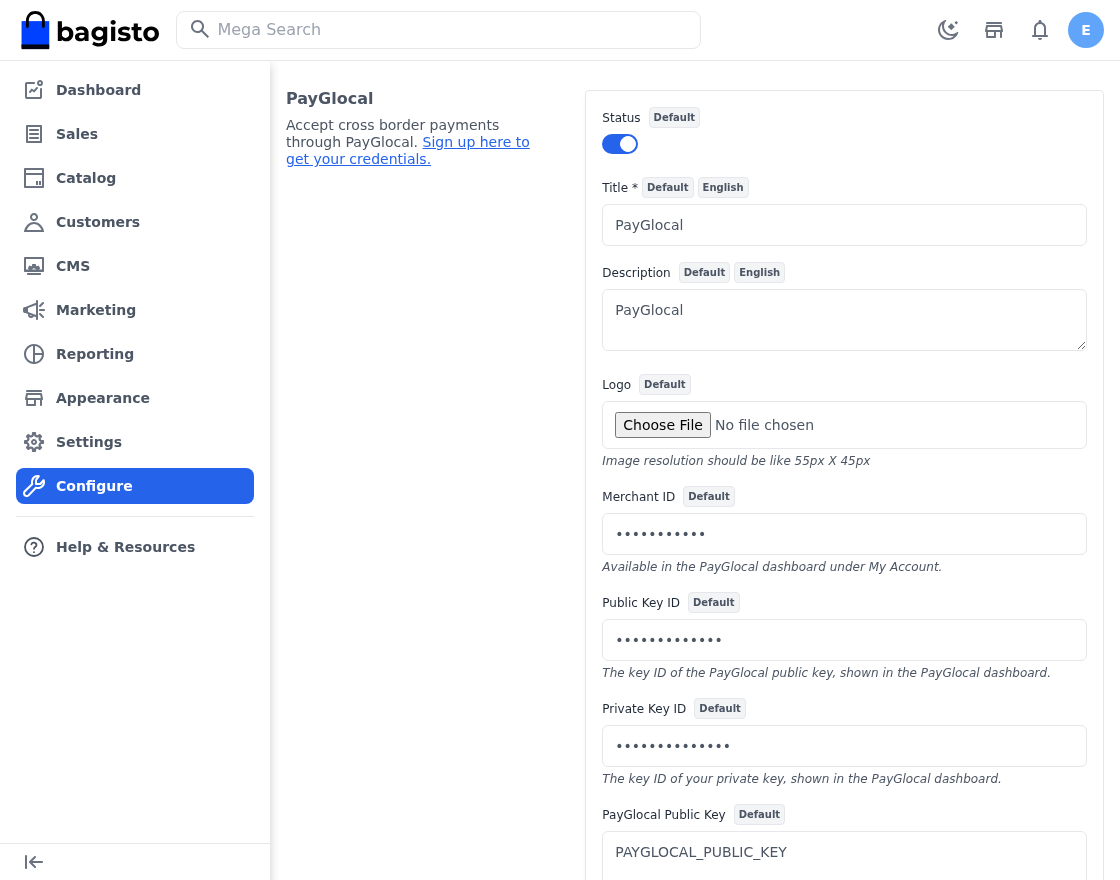
- This release adds PayGlocal as a payment method.
- Customers pay on PayGlocal’s own hosted checkout, then return to your store through a signed token.
- Bagisto confirms the outcome with PayGlocal directly before it places an order, rather than trusting that return alone.
- In addition, a webhook settles the payment even when the customer closes the tab and never comes back.
Brevo Email Driver
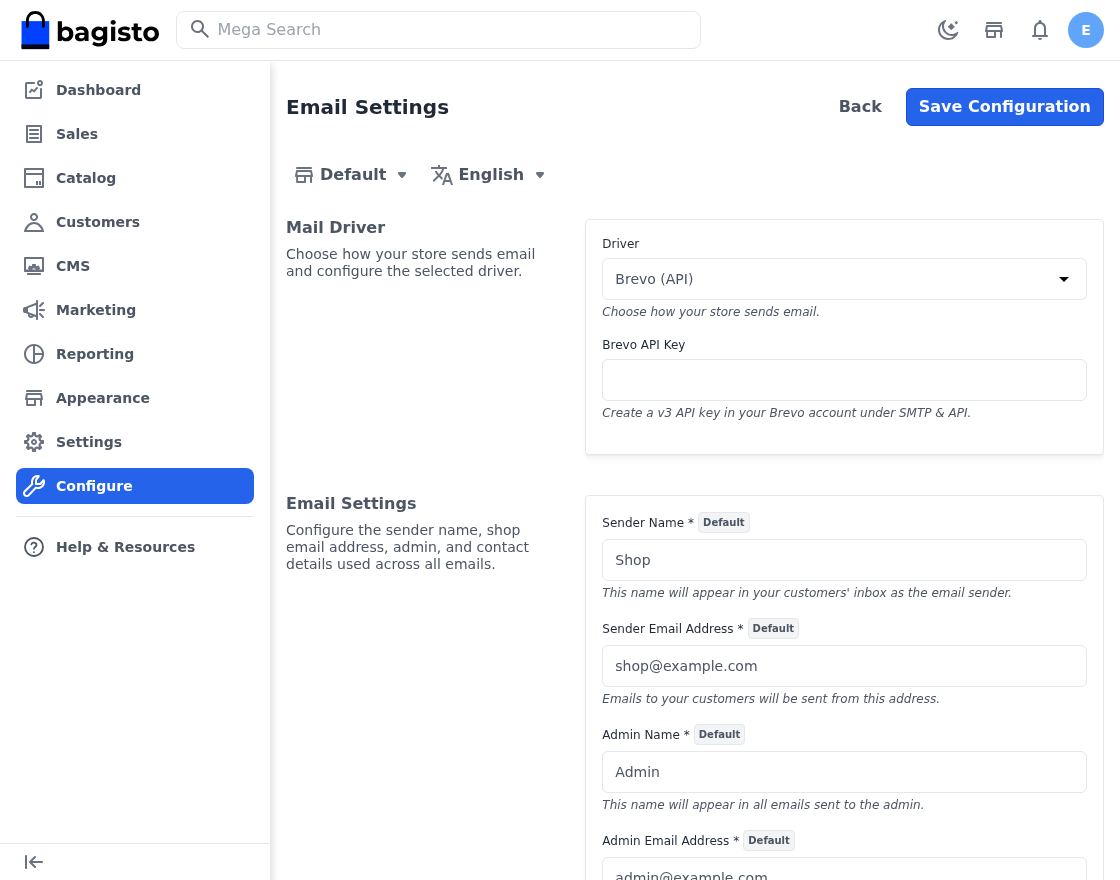
- Your store can now send its email through Brevo, over Brevo’s HTTP API and Symfony’s own bridge.
- You pick the driver in Admin → Configuration → Emails.
- That screen now shows either the SMTP fields or the Brevo API key, rather than both at once.
- As a result, you see only the settings that actually apply to your store.
Improvements in Bagisto Version 2.4.10
A Faster Product Datagrid
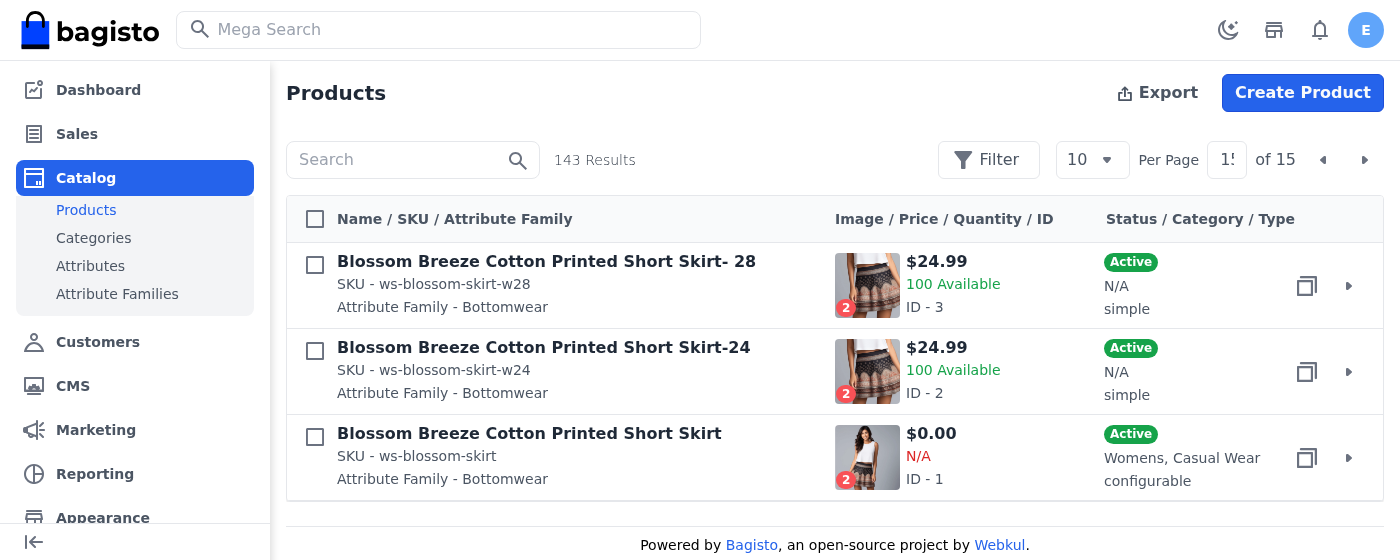
- The admin product datagrid no longer joins and groups across five tables just to draw a page.
- Quantity, image count, base image, category and family names and the manage-inventory flag now live on the flat table.
- Bagisto refreshes them as their sources change, so the grid no longer shows figures that have gone stale.
- The grid now labels products that keep no stock as “Stock Disabled” rather than “Out of Stock”, reading the product’s own setting instead of guessing from its type.
- Similarly, the Category column now lists every category a product sits in, instead of one it picked at random.

Much Lighter Reindexing
- A full reindex now asks far less of the database.
- Previously the flat indexer re-read channels, attribute values and variants once per product, and refreshed its derived columns one at a time.
- On a ten thousand product catalogue that meant roughly ten thousand statements.
- It now takes around a hundred.
Full Page Cache Settings in the Admin
- Cache Management now carries a Full Page Cache section of its own, so you no longer edit an environment file to change it.
- One switch turns the storefront page cache on or off. With it on, Bagisto serves rendered pages from the cache instead of building them for every visitor.
- A second field sets how many minutes a page stays cached before Bagisto renders it again. Leave it empty and the application default applies.
- Each channel keeps its own setting, so you can cache a busy storefront hard while you leave a staging channel uncached.
- As a result, you tune storefront performance from the admin, and switch the cache off in seconds while you debug a page.
Admin Menu, Search and Navigation
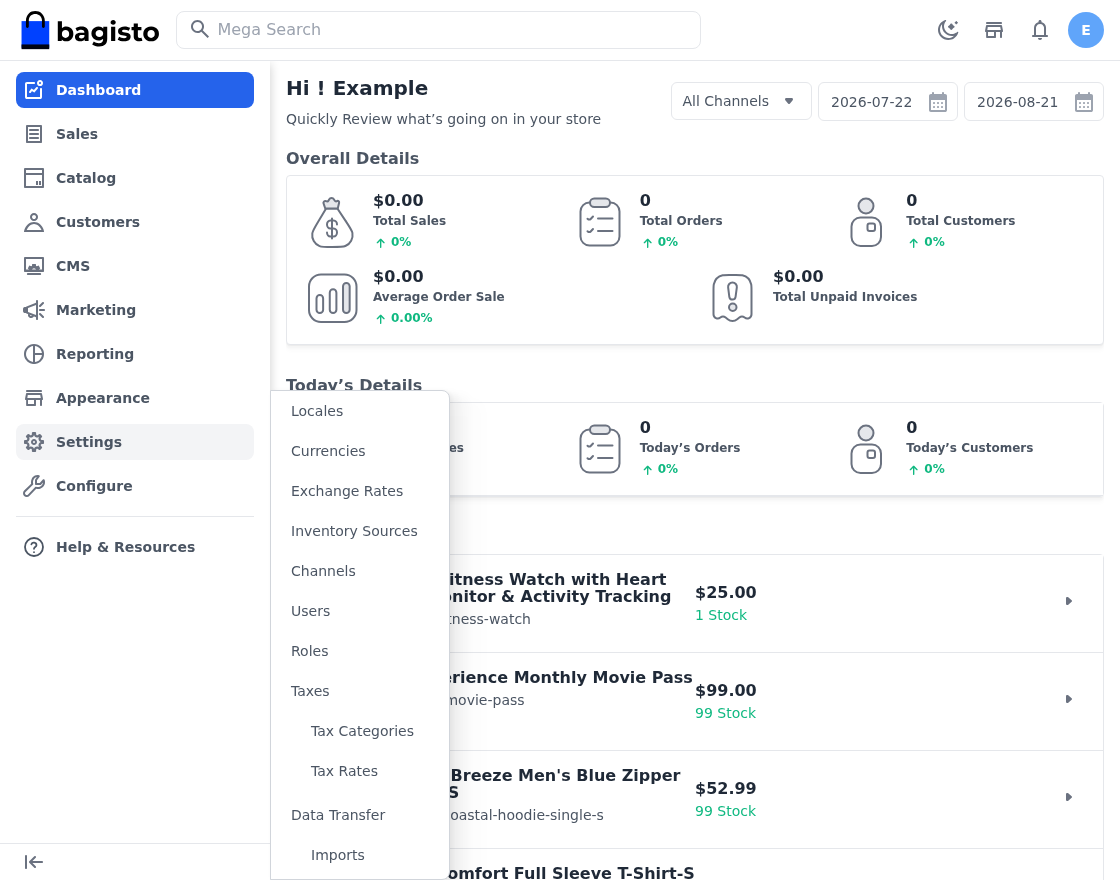
- The hover menu now opens all the way to its third level, where it previously drew the group headings on their own.
- So Tax Rates, Cart Rules, Imports and anything else under a heading no longer need you to enter their section first.
- The panel also scrolls within the window when a section runs long.
- Help & Resources now appears on a phone or tablet, where it previously sat only in the sidebar that small screens hide.
- In addition, the mega search now opens the first tab that matched, rather than leaving you on an empty one.
Other Refinements
- Bagisto now keeps locales and currencies in one list, which the console and web installers, the seeders and the translation checker all share. Adding either takes one entry rather than five.
- This release also adds the missing Romanian translations for PhonePe.
Bug Fixes in Bagisto Version 2.4.10
Payment Fixes
- Fixed PayU and PhonePe starting a payment in any currency, when both settle only in Indian Rupees. A store on a currency without two decimal places charged its customers a hundred times over. Either method now refuses a cart it cannot settle, so it declines at checkout instead of taking the wrong amount.
- Fixed resending an EU withdrawal confirmation answering the admin in the customer’s language.
- Fixed the Bahraini Dinar seeding with the text
BHDin place of its symbol.
Reporting, Search and Performance Fixes
- Fixed the debug bar’s collector keeping every query it saw for as long as the process lived, and attaching itself even on the console where it has no bar to draw. An indexer or queue worker grew by roughly half a megabyte per thousand statements.
- Fixed customer and cart reporting counting all guests as a single shopper, which understated unique customers and piled every guest’s spend onto one row of the “most sales” and “most orders” listings.
- Fixed a full Elasticsearch reindex leaving behind documents whose product had gone, which scattered blank pages through the admin listing.
- Fixed sorting the admin product datagrid by SKU or quantity failing outright in Elasticsearch mode. Sorting on a column an older index never held now leaves the order alone instead of erroring.
- Fixed the admin product datagrid ignoring search synonyms while the mega search honoured them, so the same word found different products in the two places.
Data Transfer and Import Fixes
- Fixed an import of an unreadable file answering with the raw PHP error, and a failure elsewhere in the run answering with the storage path of the uploaded file. Both now ask you to check the file, and keep the detail in the log.
- Added a way back into an import that is still running. Bagisto drew the action that opens one with an icon the admin theme does not carry, so you could not reach the progress screen again once you left it. It now reads View Progress.
- Fixed a product import creating nothing at all once the catalogue listing began keeping an image count.
Product Image and Alt Text Fixes
- #11432 Fixed an alt text over 255 characters rejecting the whole product save with nothing on screen. Bagisto now reports the limit against the Alt Text field.
- #11431 Fixed Replace Image discarding the alt text of every other locale. Replacing a file now updates the existing image instead of creating a new one and deleting the original.
- #11430 Fixed the product image panel failing to render on French and Italian installs, where an apostrophe in the translated placeholder ended the JavaScript string the template built.
- #11429 Fixed saving a product on a translated locale overwriting that locale’s alt text with the default locale’s.
- #11428 Fixed alt text saved on a non-default locale never appearing again, because the drawer read the application locale rather than the one you chose in the switcher.
- #11427 Fixed an image whose file has gone missing leaving the loading shimmer running forever. A failed load now clears the shimmer and falls back to the product placeholder.
- #11414 Fixed the product listing keeping the image you uploaded first after you reordered the images, rather than the one now sitting at the front.
Catalogue, Storefront and Admin Fixes
- #11421 Fixed a non-numeric “products per page” taking every catalogue page down with it. The field now accepts only a comma separated list of whole numbers, and the toolbar ignores a page size it does not offer.
- #11420 Fixed deleting an email template or a marketing event that a campaign uses, which left the campaign behind with nothing to send. Bagisto now refuses either while a campaign still points at it.
- #11419 Fixed the default attribute family accepting deletion, which then broke the create family screen for good, because that screen builds itself from that family.
- #11418 Fixed a customer failing to save their profile when the same email address exists on another channel. The check now scopes by channel, as registration already did.
- #11417 Fixed an attribute accepting a regular expression that is not one, which left the product create and edit screens blank. Bagisto now checks it as you type, and again when you save.
- #11416 Fixed copying a downloadable or booking product losing everything that makes it that type. Download links and samples now come across with their titles, as do booking settings and their slots or tickets.
- #11413 Fixed deleting several RMA reasons, rules or custom fields at once reporting a failure when something had already gone, while quietly deleting the ones listed before it.
- #11412 Fixed the EU withdrawals listing breaking when you filter it by customer email or status, or search it, because both columns share a name on the order the withdrawal joins to.
This release also includes security fixes.
In short, these fixes prevent incorrect charges, broken listings, and lost product content.
Conclusion
- Overall, Bagisto v2.4.10 makes the storefront easier to shape and the admin faster to work in.
- It gives themes their own area, and turns section editing into a live, drafted, drag-to-order job.
- It adds PayGlocal for payments and Brevo for email.
- It also makes the product datagrid and a full reindex considerably lighter on the database.
- In addition, it fixes payment currency handling, reporting, imports, search, and a long list of product image issues.
- Above all, this release helps store owners run their business smoothly.
Thanks for reading this blog. If you have any questions, please feel free to comment below.
Also you can hire laravel developers for your custom laravel projects. Kindly explore our extensions.